How boat Wi-Fi actually works
Your phone and laptop can already join the marina's Wi-Fi. The trouble is doing it reliably from inside the boat. As Panbo puts it, a laptop's or tablet's low-power Wi-Fi radio and small internal antenna have limited range, "and especially so lower in the boat". A fiberglass hull, a steel mast and a few hundred feet of pontoons between you and the marina's access point finish the job.
A marina Wi-Fi booster solves this with two pieces:
- The booster: a weatherproof Wi-Fi radio with a proper external antenna, mounted as high as practical on a rail, arch or mast. It joins the marina's network on the boat's behalf.
- A router below deck: the booster plugs into the router's internet (WAN) port, and the router broadcasts your own private Wi-Fi network. Every phone, tablet and laptop on board joins that network instead of reaching for the marina directly.
That split is the standard setup: Wave WiFi's quick-start guide tells you to plug its Rogue boosters into your router's "internet or WAN port", and notes the Rogue "will be using your router to broadcast its Wi-Fi signal". Because your router sits in front of everything on board, the marina's network sees one connection from the boat rather than every device aboard, and your onboard network keeps the same name and password wherever you are. If you already own a router from our marine cellular router guide, a booster plugs straight into its WAN port.
Range, bands and the 1-watt limit
Real range is measured in feet, not miles
Booster marketing likes big numbers: Wave WiFi's own Rogue Wave page advertises "Up to 7-mile range*". Wave's own FAQ is more candid: 5 GHz is "typically accessible for 1000'", and 2.4 GHz is "typically accessible at 1 mile or less but with a good base hotspot 3-5 miles can sometimes be achieved." The height of the marina's antenna matters as much as yours. Plan on reaching the marina you're in, and perhaps the one across the harbor, not the next town.
Even a strong link doesn't guarantee speed. Wave's FAQ again: a marina hotspot "will not give you their full bandwidth/speed... it's a shared system." On a busy summer weekend you are splitting the marina's internet connection with every other boat.
Why "more power" isn't the answer
US rules set a hard ceiling. Under 47 CFR 15.247, Wi-Fi equipment in the 2.4 GHz and upper 5 GHz bands is limited to 1 watt of output with an antenna of up to 6 dBi; with a higher-gain omni antenna the output must come down dB for dB. Wave's most powerful unit is rated at 1 W, described as the "highest allowable". So once a booster is at the legal limit, the remaining gains come from mounting height, a clear line of sight to the marina's access point, and the right band, not from a bigger number on the box. Transmit power also has to work both ways: your booster can shout, but it still has to hear the marina's much weaker access point.
2.4 GHz vs 5 GHz
- 2.4 GHz has "the longest range and wall-penetration capability of the available bands", per Intel, with typical top speeds around 100 Mbps. It is also crowded: most legacy devices use it, and only channels 1, 6 and 11 avoid overlapping each other.
- 5 GHz tops out around 1 Gbps with far less congestion, but shorter range. Digital Yacht notes that 5 GHz marina networks "are gradually replacing the older and more congested 2.4GHz networks", and Panbo found 5 GHz to the same hotspot "is often faster and more reliable", connecting from a quarter of a mile away in its 2020 test.
The practical answer is a dual-band booster: take 5 GHz when you're close enough, and fall back to 2.4 GHz when you're not.
Marina login pages (captive portals)
Most marina networks make you accept terms or enter a code before they let traffic through. The formal name is a captive portal, which the IETF defines as "a network that limits the communication of attached devices to restricted hosts until the user has satisfied Captive Portal Conditions" (RFC 8952). With a booster and a router between you and the marina, the login page has two extra devices to get through, and this is where most "the booster doesn't work" complaints start.
- Pick a booster that handles portals. Wave's FAQ says its receivers "usually detect Captive Portal and display means to open the required page".
- If the page doesn't appear, open a new browser tab to a plain http address, or ask the marina office for the sign-in address and go to it directly.
- Don't set a static IP on the booster; Wave warns that it breaks the sign-in.
- Expect some trial and error with DIY radios. Owners of MikroTik-based setups report that running two routers in a row (double NAT) "often causes trouble with captive or referred portals"; MikroTik itself doesn't document portal handling.
Three setups compared, in detail
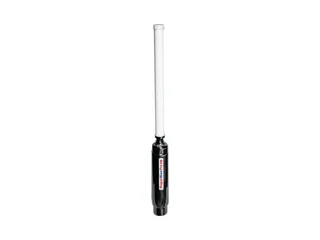
Wave WiFi Rogue Pro DB — the marina booster to buy
The Rogue Pro DB is the marine booster we can recommend with confidence in 2026, largely because its competition has thinned out (see brands that disappeared). It's a 17-inch stainless unit on a standard 1"-14 marine mount thread, and one 25 ft Ethernet cable carries both power and data to a PoE injector below deck that runs from 12 V DC or AC. Wave's product page lists concurrent 2.4 and 5 GHz support, and its FAQ documents marina login-page detection and free firmware updates, which matters more than any spec: a booster is only useful if the maker keeps it working with new marina networks. Panbo's hands-on comparison found that "what took ten steps on the Ubiquiti took four on the Wave." You supply the router; the Rogue plugs into its WAN port. Wave sells through marine dealers rather than Amazon, and publishes no list price; two US dealers had it at $716 when we checked.
Strengths
- Dual-band: 5 GHz when close, 2.4 GHz for reach
- Marine stainless housing, standard 1"-14 mount thread
- One cable for power and data, 12 V PoE injector included
- Documented login-page detection and free firmware updates
- Plugs into any router you already own
Trade-offs
- Wi-Fi 4 with a single antenna and a 10/100 port; Wave's pricier Professional Series is where Wi-Fi 5 lives
- Needs a separate router, and every extra hop costs some speed
- Its settings page has no password, per Wave's FAQ; keep it behind your router
- The mount is sold separately, and it isn't on Amazon
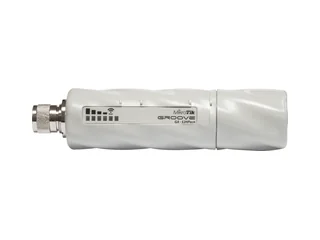
MikroTik GrooveA 52 ac — the DIY route
MikroTik's Groove is the radio that cruisers who like to tinker have used for years, and on paper it's newer than the marine kits: 802.11ac, a Gigabit port, and an included omni antenna rated 6 dBi at 2.4 GHz and 8 dBi at 5 GHz, for a $99 suggested price (about $104 on Amazon when we checked). It runs on 10–30 V passive PoE at 5 W maximum, so it's easy on the house bank. The trade-offs are real, though. You configure it yourself in MikroTik's RouterOS, and the best-known walkthrough, Seabits' setup guide, warns that changing its modes has "rendered the Groove unreachable" and that it "will not function as both a remote WiFi grabbing device, and a WiFi router". It works on one band at a time. And the US model is, in MikroTik's words, "factory locked for 2412-2462MHz, 5170-5250MHz and 5725-5835MHz frequencies", so by our reading it can't join a marina access point running on the channels in between. You also source the mount and cable run yourself.
Strengths
- About a seventh of the price of a marine kit
- Wi-Fi 5 radio and a Gigabit port
- Low 5 W draw on 10–30 V PoE
- Deeply configurable if you know RouterOS
Trade-offs
- Hard to configure; the popular guides date from 2018
- One band at a time
- US model locked out of the middle 5 GHz channels
- IP55 rather than a marine enclosure; mount and cable are on you
- Login-page handling isn't documented
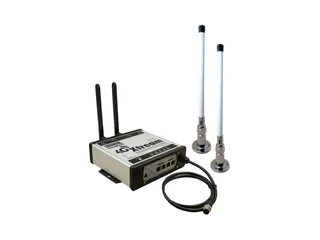
Digital Yacht 4G Xtream + Wi-Fi antenna kit — Wi-Fi and cellular in one box
If you want one box that uses marina Wi-Fi in port and cellular everywhere else, the 4G Xtream is the integrated marine option we'd pick. It's an LTE Cat 6 router with dual SIMs and failover, a dual-band 802.11ac access point for the boat, plus GPS, Bluetooth and NMEA 2000. Its published US bands include Verizon's (B13 and B66), which Glomex's US weBBoat model lacks. Marina Wi-Fi comes from Digital Yacht's Wi-Fi antenna kit ($549.95): a 15 dBi antenna, mounting base and 10 m of low-loss cable that lets one of the Xtream's two Wi-Fi modules connect to a marina hotspot on either band. That makes it expensive: the Xtream was $1,319.95 on sale at Digital Yacht's US store (about $1,377 on Amazon), so around $1,870 with the kit. Two more cautions. It's 4G only with 10/100 ports, and Digital Yacht is inconsistent about this exact setup: the Xtream's own FAQ calls connecting to shore Wi-Fi this way "isn't recommended or supported" and points to the WL510 booster, which Digital Yacht no longer sells, while its store sells the kit for precisely that job. Ask the dealer to confirm current support before you buy.
Strengths
- Cellular and marina Wi-Fi from one marine box
- Dual SIM with failover; US bands include Verizon's
- Dual-band Wi-Fi 5 access point for the boat
- GPS, Bluetooth and NMEA 2000 built in
- Cellular reach "up to 25NM offshore (network dependent)", per Digital Yacht
Trade-offs
- About $1,870 with the Wi-Fi kit, plus a cellular plan
- 4G only, 10/100 ports, no T-Mobile band 71
- Power draw and login-page handling aren't published
- Digital Yacht's own FAQ contradicts the shore-Wi-Fi kit it sells
Wave's EC-HP DB AC is its 1 W, Wi-Fi 5, Gigabit flagship at around $2,290 at one dealer: worth it for a marina far from the access point, overkill for most. The cheaper Rogue Wave ($446) is 2.4 GHz only. Wave's MBR 550 router ($1,346) adds LTE, but its onboard Wi-Fi is 2.4 GHz only. Glomex's weBBoat 4G Plus EVO ($1,750) lists only US LTE bands 2, 4 and 12, so no Verizon. The ALFA CampPro 3 kit showed as out of stock everywhere we looked.
Marina Wi-Fi vs cellular vs Starlink: three-year costs
A booster only helps within about a mile of a hotspot, so the right answer depends on where the boat spends its nights. Here are the three routes on the same three-year basis we use across the site:
| Route | What you buy | Monthly | 3-year cost | Works where |
|---|---|---|---|---|
| Marina Wi-Fi booster | Booster (~$104–$716) + a router | None, if Wi-Fi comes with the slip | Roughly the hardware price | Within ~1 mile of a marina hotspot |
| Cellular router | Router + antenna, ~$530 | $60–$80 | ~$2,690–$3,410 | Near cell towers; up to ~20–25 NM offshore |
| Starlink | Mini, $249 | $55 (Roam 100GB) | ~$2,229 | Inland and coastal waters to 12 nm on Roam |
Cellular and Starlink figures come from our cellular router and Starlink guides. Marinas vary on whether Wi-Fi is included with a slip or transient night, so check before counting it as free. Many cruisers end up with two layers: a booster for port, and cellular or Starlink for everywhere else. Our marine internet stack guide shows how to combine them.
Security on marina Wi-Fi
The public network itself is less of a worry than it used to be. The FTC's guidance is that "because of the widespread use of encryption, connecting through a public Wi-Fi network is usually safe", provided sites use https and you use strong passwords, two-factor authentication and current software.
The bigger risk on a boat is your own gear. Wave's FAQ notes that its Wi-Fi products "do not have a password to log in" to their settings page, and Digital Yacht calls it "very important that you 'lock down' your wireless network". Put the booster behind your router, set a strong admin password on the router, and use WPA2 or WPA3 on your onboard network. If you reach the boat's systems remotely, use a VPN; our marine VPN guide covers the setups that work.
Install and power
- Mount high, with a clear view of the marina. Height and line of sight to the marina's access point are what extend range, far more than the booster's spec sheet. A rail or arch mount above the cabin top is typical; avoid mounting right next to other antennas or metal masts.
- One cable, planned route. The Rogue ships with a 25 ft Ethernet cable that carries power and data; the Groove needs its own cable and mount. Measure the run before you buy, and seal the deck penetration.
- 12 V power is modest. The Rogue is rated at 12 V, 1 A through its PoE injector; the Groove at 5 W maximum; Wave's MBR routers at 12 V, 1–2 A. Wire the injector like any other 12 V circuit, on its own fused, switched feed. Compare that with a Starlink Mini at 20–40 W average.
- Keep the router dry. Routers and PoE injectors belong below deck; Digital Yacht rates the Xtream's main unit IPX4 for that reason.
Brands that disappeared (and still show up in old lists)
Several of the names you'll find in older "best boat Wi-Fi" articles are no longer good buys. As of September 2026:
- The Wirie: Practical Sailor reports the Wirie and WiriePro are "no longer in production, or supported by the manufacturer", and the old Wirie website no longer belongs to the company.
- KING: its site announces a final liquidation, selling remaining WiFiMax stock.
- Digital Yacht WL510 / WL520: the product pages are gone from Digital Yacht's US and UK sites.
- ALFA CampPro kits: listed as out of stock on ALFA's own site.
- Bitstorm and Island Time: we couldn't reach either company's site, so we can't confirm they're still selling.
Buying a discontinued booster second-hand may still work today, but you lose firmware updates, which is what keeps a booster compatible with new marina networks and login pages.
Frequently asked questions
What is a marina Wi-Fi booster and do I need one?
A marina Wi-Fi booster is a weatherproof Wi-Fi radio with an external antenna, mounted high on the boat and wired to a router below deck. It reaches the marina's hotspot far better than a phone or laptop inside the cabin, whose small internal antennas have limited range, especially low in the boat. The router then makes your own onboard network, so every device on board shares the one boosted connection. If your slip includes marina Wi-Fi and you can't use it reliably from below, a booster is the cheapest fix: a one-time hardware cost and no monthly bill.
How far can a boat Wi-Fi booster reach?
Less than the marketing says. Wave WiFi's own FAQ puts 5 GHz at about 1,000 feet and 2.4 GHz at typically a mile or less, with 3–5 miles possible only with a good hotspot on the shore side. Claims of '7-mile range' contradict that. Height and a clear line of sight to the marina's access point matter more than anything else, and US rules cap these radios at 1 watt of output, so more power is not the answer.
Should I use 2.4 GHz or 5 GHz marina Wi-Fi?
Use 5 GHz when you can reach it. 2.4 GHz travels further and through obstacles better, but it is crowded: most older devices use it and only three of its channels don't overlap. 5 GHz is much faster and marinas are gradually moving to it, but its practical range is shorter. A dual-band booster lets you take 5 GHz when you're close and fall back to 2.4 GHz when you're not.
Why won't my marina Wi-Fi login page appear through the booster?
Many marina networks are captive portals: they block traffic until you accept terms or enter a code on a login page. Good boosters detect the portal and show the page, but it can still get stuck behind two routers. Open a new browser tab and go to a plain http address, ask the marina office for the sign-in address, and don't give the booster a static IP address, which Wave WiFi says breaks the sign-in.
Is a Wi-Fi booster better than cellular or Starlink on a boat?
It's cheaper, not better at everything. A booster only works within roughly a mile of a hotspot, so it suits boats that spend most nights in marinas with included Wi-Fi. Cellular reaches much further offshore and Starlink works almost anywhere, but both carry monthly fees. On our three-year numbers a Starlink Mini on Roam 100GB costs about $2,229 and a cellular router setup about $2,690–$3,410, against a booster's one-time hardware price. Many cruisers run a booster in port and cellular or Starlink away from it.
Is it safe to use public marina Wi-Fi?
Usually, for normal browsing: the FTC notes that widespread encryption makes public Wi-Fi generally safe, provided sites use https and you use strong passwords, two-factor authentication and up-to-date software. The bigger risk on a boat is your own equipment: lock down the booster and router admin pages, and consider a VPN if you manage the boat's systems remotely.
The short version, by boat
Most boats that spend nights in marinas: Wave WiFi Rogue Pro DB, about $716 from marine dealers, plugged into the router you already have. Dual-band, marine-built, supported, and no monthly bill.
Comfortable with networking and on a budget: MikroTik GrooveA 52 ac, about $104. A better radio for the money, if you're prepared to configure it and live with one band at a time.
Want marina Wi-Fi and cellular in one box: Digital Yacht 4G Xtream with its Wi-Fi kit, about $1,870 plus a data plan. Confirm shore-Wi-Fi support with the dealer first.
Away from marinas most of the time: a booster won't help. Go straight to a cellular router or Starlink.