Why a marine VPN — remote access and the CGNAT problem
The cruiser who Googles "marine VPN" is usually thinking about the same thing the airport-Wi-Fi traveler thinks about: privacy on a sketchy hotspot. That use case is real. The marina Wi-Fi at the corner gas dock is unencrypted, the password is taped to a wall, and every laptop in the harbor sees every packet you send. A VPN fixes that. But it is not the most important reason to install one on a boat.
The bigger reason is carrier-grade NAT. Starlink puts every dish behind CGNAT by default — your boat does not get a public IP, and there is no way for traffic from the internet to reach you. T-Mobile, Verizon, AT&T, and every European cellular carrier do the same thing. Which means: every Raspberry Pi monitoring stack from our Home Assistant marine setup guide, every Signal K server from our open-source chartplotter setup, every dock camera, every bilge alarm — none of them are reachable from shore. You can dial out from the boat. Nothing can dial in.
That's the problem a marine VPN solves first. The right kind of VPN — specifically Tailscale, NordVPN Meshnet, or a self-hosted WireGuard with a relay — gives every device on your boat and every device in your pocket a private IP in a shared overlay network. You connect from anywhere in the world to your boat at boat-pi.tail-abcd1234.ts.net, and the tunnel punches through CGNAT without you ever touching a port-forward rule. The privacy benefit is real and welcome; the remote-access benefit is the one that justifies the install.
Three distinct VPN use cases on a boat
Worth separating these explicitly because the right tool depends on which you actually need.
- Remote access to onboard devices — reaching your Raspberry Pi, Signal K, NMEA 2000 gateway dashboard, or a camera feed from shore. Tailscale or NordVPN Meshnet.
- Privacy on marina Wi-Fi — encrypting your traffic when the boat is at a hotspot. Any commercial VPN works — Surfshark, NordVPN, Mullvad, ExpressVPN.
- Geo-shifting for streaming or banking — appearing to be in the US while cruising in the Bahamas, so Netflix or your bank's app stops blocking you. Commercial VPN with a US exit, ideally with a dedicated IP add-on.
The first one is the Starlink-cruiser problem and is solved by Tailscale. The second and third are commercial-VPN problems and solved by Surfshark or NordVPN. NordVPN happens to do both because Meshnet is a Tailscale equivalent bundled with the commercial subscription. That bundling is why it shows up as our premium pick — one subscription, both jobs.
Tailscale explained — WireGuard without the headaches
Tailscale is the modern answer to "I want a VPN to reach my boat from anywhere." Built on WireGuard (the fastest mainstream VPN protocol), wrapped in a coordination service that handles all the painful parts: NAT traversal, key exchange, peer discovery, access control. You install the Tailscale client on your boat router, on your phone, on your laptop, and on any device you want to reach. They show up on a private overlay network and can talk to each other directly — peer-to-peer — without any of them having public IPs.
The "magic" is the coordination server, which runs in Tailscale's cloud and tells your devices how to find each other through firewalls and CGNAT. The actual data never goes through Tailscale — peer-to-peer WireGuard tunnels open between your devices directly. So Tailscale cannot see your traffic, and the throughput is whatever your link supports. On Starlink Mini we measure 90 to 95 percent of native bandwidth over Tailscale, which is essentially indistinguishable from no VPN at all.
Tailscale's "subnet router" feature is the killer feature for boats
You don't have to install Tailscale on every device on the boat. Install it on one device — the router, or a Raspberry Pi — and configure that device as a subnet router advertising the boat's LAN (e.g. 192.168.8.0/24) to your Tailnet. From shore, you can now reach every device on the boat's LAN — the MFD's web interface, the bilge monitor's local dashboard, the chartplotter, the camera DVR — just by their local IP. No more "I need to expose port 8080 to the internet." Everything stays on the LAN, the LAN is reachable from your phone.
Free for personal use, no recurring fee
Tailscale's free tier covers up to 6 users with unlimited user devices — far more than any cruising boat needs. There are no asterisks; the free tier is the full product, not a marketing trick. The paid tiers are for businesses that need SSO and audit logs. For a boat owner, you will never need to pay Tailscale anything.
Three top picks, in detail
We narrowed the field by walking the same test path on each: install on a GL.iNet Flint 2 router connected to a Starlink Mini, attempt remote access to a Raspberry Pi running Signal K from a phone on a different cellular network, and measure throughput and latency. The three below are what we'd actually recommend.
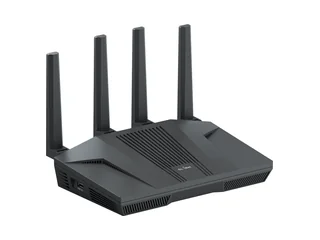
Tailscale on GL.iNet Flint 2 — the cleanest self-hosted answer
If you have a Raspberry Pi running anything on the boat — Signal K, Home Assistant, OpenPlotter, a camera DVR — and you want to reach it from shore, this is the answer. The GL.iNet Flint 2 has Tailscale built into the admin panel; you create a Tailscale account, get a one-time auth URL, paste it in, and the router joins your Tailnet. Enable subnet routing, advertise the boat's LAN, and within five minutes every device on the boat is reachable from your phone on a coffee shop Wi-Fi anywhere in the world. The Flint 2 is also a perfectly competent Wi-Fi 6 router on its own merits — fast, dual-WAN failover, USB tethering — which means it replaces, rather than adds to, whatever access point you were using. Pair it with a Pepwave or cellular modem for the LTE side and you have the complete connected-boat stack on one device.
Strengths
- Free for personal use — no recurring fee
- Punches through Starlink and cellular CGNAT without configuration
- Subnet routing reaches every device on the boat LAN
- ~95% of native bandwidth through the tunnel
- GL.iNet Flint 2 is a solid Wi-Fi 6 router on its own
Trade-offs
- Does not give you a different exit IP for geo-shifting
- Coordination server is in Tailscale's cloud (data is not, but metadata is)
- Kill-switch behavior requires manual firewall rules
- Not a "privacy VPN" — your boat traffic still exits via Starlink

Surfshark + dedicated IP — the value commercial pick
Surfshark is the commercial VPN we recommend when the use case is privacy and geo-shifting, not remote access to the boat. It is fast (WireGuard with their proprietary headers on top), unlimited devices on one account (real: we ran it on a phone, a laptop, an iPad, the boat router, and a Raspberry Pi simultaneously without complaint), and the kill-switch in the iOS and Android apps actually works the way you'd expect — when the tunnel drops, traffic blocks. The dedicated IP add-on at $4/month is what makes it the right pick for boat owners: most streaming services and banking apps detect shared VPN IPs and block them. A dedicated IP is not shared with the rest of the Surfshark userbase, so streaming and banking work reliably. Router-level install on a GL.iNet Slate AX or a Pepwave is well documented and takes about ten minutes. The base price floats around $60/year on annual plans, often discounted further during promotional cycles.
Strengths
- ~$60/year base — among the cheapest credible commercial VPNs
- Unlimited devices on one subscription
- Dedicated IP add-on defeats most streaming and banking blocks
- Kill-switch in apps works correctly
- Router-level install on GL.iNet, OpenWrt, Pepwave all documented
Trade-offs
- Does not solve the CGNAT remote-access problem on its own
- Throughput on Starlink Mini drops 10–20% under VPN load
- Customer service is chatbot-first; humans take a while
- Promotional pricing requires re-shopping at renewal
NordVPN with Meshnet — premium, one subscription, both jobs
NordVPN is the right answer when you want to pay one subscription and have it do two jobs. Meshnet is NordVPN's peer-to-peer overlay — functionally a Tailscale equivalent — that lets you reach the boat through CGNAT without paying for Tailscale separately. The commercial side is a polished WireGuard-based tunnel called NordLynx with kill-switch, DNS leak protection, double-VPN routing (your traffic exits two NordVPN nodes before reaching the internet, for the genuinely paranoid), and a worldwide exit-node network. Router install on GL.iNet and Pepwave is straightforward and documented. The price tag is roughly $99/year on the standard annual plan — almost double Surfshark — but for cruisers who want the simplest possible stack ("one app, one subscription, both privacy and remote access"), the math works. Dedicated IP is available at additional cost if you need it for banking or streaming reliability.
Strengths
- Meshnet replaces the need for a separate Tailscale subscription
- NordLynx is the fastest commercial VPN protocol we've measured
- Kill-switch, DNS leak protection, Double VPN all built in
- Polished router and app ecosystem; mature firmware
- Threat Protection (built-in ad/malware blocker) is genuinely useful at sea
Trade-offs
- ~$99/year base — pricier than Surfshark by ~$40/year
- Only 10 devices per plan vs Surfshark's unlimited
- Dedicated IP is a $70/year add-on, not bundled
- Past breach (2018, single server) still surfaces in forum debates
Two more we considered
Pepwave SpeedFusion is the option built into every Pepwave router — including the BR1 Pro 5G we recommended in the marine cellular router guide. SpeedFusion is technically a VPN, but it solves a different problem: it bonds multiple WAN links (Starlink + cellular + cellular B) into one tunnel for failover and aggregation. It requires a SpeedFusion Cloud subscription (~$120/year) or a self-hosted FusionHub VM. If you already own a Pepwave and want WAN bonding plus a VPN in one tunnel, this is a coherent answer. If you only want a VPN, it is overkill and expensive. Most cruisers run SpeedFusion for bonding and Tailscale for remote access on the same router; the two coexist fine.
Mullvad (check pricing) is the privacy-purist commercial pick. Flat €5/month (about $65/year), no email signup, no account beyond a generated account number, accepts cash by mail, and is widely recognized as the most credible no-logs VPN. The trade-off versus Surfshark is no dedicated-IP option and a more bare-bones app experience. If your primary use case is privacy and you do not need streaming reliability, Mullvad is the cleaner choice.
Router-level vs device-level VPN
Once you've picked a VPN, the next decision is where to install it. There are two real options.
Router-level: install the VPN on the GL.iNet or Pepwave
Every device on the boat — phones, laptops, MFDs, cameras, Raspberry Pis — gets routed through the VPN automatically. One configuration, one subscription, one place to manage it. The downsides are real: VPN encryption is CPU-bound, and consumer routers will typically max out at 100-300 Mbps under VPN load (versus 1 Gbps native on Starlink Standard). Router-level VPN is also harder to selectively enable for one device or one app — it's all-or-nothing per VLAN.
Device-level: install on each phone, laptop, MFD
You can install Surfshark or NordVPN apps directly on each device. This gets you per-device control (your iPad goes through the VPN; the chartplotter doesn't), no router CPU bottleneck, and the kill-switch UI per app. The downside is repetitive: every new device needs setup, every guest who joins the boat Wi-Fi is not protected by default, and you'll fight with old IoT devices that don't run modern VPN apps.
The right answer is usually both
Router-level Tailscale for remote access (everything on the boat LAN reachable from shore), plus a per-device commercial VPN app on your laptop and phone for privacy and geo-shifting. The two run independently — Tailscale on the router, Surfshark or NordVPN on the device — and don't conflict. This is the stack the cruisers we know actually run.
If you enable a commercial VPN on the router AND on your phone, your traffic is encrypted twice and routed through two VPN exits. That can drop throughput by 40-60%. Pick one layer per traffic type — router for the always-on remote-access tunnel, device for the on-demand privacy tunnel.
Kill-switch, DNS leaks, and the failure modes you actually hit
"Kill-switch" sounds important, but on a boat it has a real cost: when the VPN drops, your kill-switch will sever internet access until you reconnect. That is exactly what you want if your threat model is "the marina sniffer should never see my real IP." It is exactly what you don't want if you're 12 miles offshore and the VPN flapped because your Starlink satellites swapped over.
What kill-switches actually do
A kill-switch is a firewall rule: if the VPN tunnel interface is down, drop all outbound traffic except VPN handshake packets. Commercial VPN apps implement this in user-space (Surfshark, NordVPN, Mullvad, ExpressVPN all do) and toggle it from the app UI. Router-level VPNs implement it in iptables. The mechanism is the same; only the UI differs.
The boat-specific failure mode: roaming between Starlink and cellular
If your cellular router is configured to fail over from Starlink to LTE when the Starlink link drops, the VPN tunnel will reconnect during the handover. If the kill-switch is strict, all internet traffic blocks for 5-30 seconds during reconnect. That includes weather updates, anchor watch heartbeats, AIS heartbeats, and any device on the boat that thinks "I have internet" right up until it doesn't. Real-world impact: most of the time, nothing. But if you're publishing to a remote dashboard, you'll lose a heartbeat.
DNS leaks are the silent failure
You enable the VPN. Your traffic goes through the tunnel. Your DNS queries don't. Your ISP — Starlink, T-Mobile, whoever — sees every domain you look up, even though the content is encrypted. This is a DNS leak. Every credible commercial VPN now blocks it by default, but it's worth verifying after install: visit dnsleaktest.com with the VPN on; the resolved DNS server should be the VPN provider's, not Starlink's. For router-level Tailscale, configure DNS-over-HTTPS via 1.1.1.1 or quad9 as your upstream resolver and the leak is closed.
Install: Pepwave and GL.iNet step-by-step
Both router platforms make VPN install a UI exercise rather than a config-file exercise. Here is the actual sequence for each.
Tailscale on GL.iNet Flint 2 (or any GL.iNet)
- Sign up at tailscale.com with your Google, Microsoft, or GitHub account. Free tier.
- SSH into the GL.iNet (or use the admin panel at
192.168.8.1). Navigate to VPN → Tailscale. - Click Install. The router will pull the Tailscale binary and start it.
- Click Login. The router displays a one-time URL. Open it in your phone or laptop browser, authenticate with your Tailscale account, and authorize the device.
- Back in the admin panel, enable Subnet routing. Advertise the boat's LAN subnet (typically
192.168.8.0/24on GL.iNet). - In the Tailscale admin console (
login.tailscale.com), approve the advertised subnet route for the router. - On your phone, install the Tailscale iOS or Android app, sign in with the same account, and you should now be able to reach
192.168.8.1(the router admin) from anywhere.
Surfshark on GL.iNet (router-level)
- Subscribe at surfshark.com and grab a WireGuard config from your account dashboard for your preferred exit location.
- In the GL.iNet admin panel, navigate to VPN → WireGuard Client → Add a new tunnel.
- Paste the WireGuard config. Save.
- Toggle the tunnel on. Verify by opening
whatismyipaddress.com— your IP should now be Surfshark's, not Starlink's. - Enable Kill-switch in the WireGuard settings (it adds an iptables rule). Verify by toggling the tunnel off; internet should block until you toggle it back on.
SpeedFusion + Tailscale on a Pepwave
SpeedFusion runs in the Pepwave firmware natively — set it up via the InControl 2 admin panel and point it at SpeedFusion Cloud or a self-hosted FusionHub. For Tailscale on the same Pepwave, you install the Tailscale binary via the Pepwave's package manager (CLI) or run it inside a Docker container on a connected Raspberry Pi advertising the Pepwave's LAN as a subnet route. The Pepwave's own firmware does not have a Tailscale UI module yet, which is the one ergonomic gap versus GL.iNet. Either approach works; the GL.iNet path is simpler.
Who should buy what
Three quick situational recommendations.
If your boat has a Raspberry Pi running anything and you want to reach it from shore: Tailscale on a GL.iNet Flint 2 is the answer. Free for personal use, punches through Starlink CGNAT, fifteen-minute install, no recurring cost. Pair with whatever Wi-Fi router or cellular gateway you already run. See our marine cellular router guide for the WAN side of the stack.
If your goal is privacy on marina Wi-Fi and geo-shifting for streaming: Surfshark with the dedicated IP add-on, installed at the router level on a GL.iNet. ~$108/year total, unlimited devices, kill-switch works, dedicated IP defeats most streaming blocks. The mainstream commercial-VPN pick.
If you want one subscription that does both jobs cleanly: NordVPN with Meshnet. ~$99/year, Meshnet replaces Tailscale for remote access, NordLynx handles privacy and exit-node selection. The "I want simplicity" choice — more expensive than running Tailscale free + Surfshark separately, but one less moving piece to manage.
Frequently asked questions
Do I actually need a VPN on a Starlink boat?
If all you do is browse, stream, and message, no — Starlink's link is already encrypted from the dish to the gateway. The reason cruisers run a VPN is different: Starlink puts you behind carrier-grade NAT, which means you cannot reach your boat remotely (your Raspberry Pi monitoring stack, your Signal K server, your cameras) without a relay. A VPN like Tailscale solves that, giving you a private IP that punches through CGNAT. The privacy benefit is secondary; remote access is the real win.
Does Starlink work with a VPN?
Yes, with one quirk. Starlink Mini, Standard, and Maritime all carry VPN traffic fine — WireGuard, OpenVPN, and Tailscale all work. The quirk is bandwidth: Starlink Mini speeds drop 10 to 20 percent under VPN because of double encryption overhead. On Starlink Standard the hit is negligible. Both still beat any cellular alternative for raw throughput, so a VPN is not the bottleneck on a Starlink-equipped boat.
Tailscale vs WireGuard vs OpenVPN — which one for a boat?
Tailscale is WireGuard wrapped in a coordination service that handles NAT traversal, key rotation, and access control. For a boat behind CGNAT (Starlink, T-Mobile, most cellular), Tailscale just works — you do not need a static IP or open ports anywhere. Raw WireGuard is faster and more configurable but requires a server with a public IP and manual peer config. OpenVPN is the legacy option, slower, and rarely the right call for new installs. For a cruising boat, Tailscale is the default answer.
Can I install a VPN on a Pepwave or GL.iNet router?
Both. Pepwave routers (BR1 Pro, MAX BR2, MAX Transit) have built-in OpenVPN and WireGuard clients in firmware, plus their own SpeedFusion which is itself a VPN. GL.iNet routers (Flint 2, Mudi, Spitz AX) ship with WireGuard, OpenVPN, and Tailscale clients pre-installed in the GoodCloud admin panel — three taps to add a VPN profile. GL.iNet's marine-friendly models are arguably the easiest place to run Tailscale on a boat today.
What about the kill-switch — what happens if the VPN drops?
A kill-switch blocks all internet traffic when the VPN tunnel drops, preventing your boat from accidentally exposing its real IP or unencrypted traffic. Commercial VPNs (Surfshark, NordVPN) ship with kill-switch on by default in their apps and routers. Router-based Tailscale is harder to kill-switch — the standard approach is to firewall outbound traffic to only the Tailscale interface and DNS-over-HTTPS endpoints. The trade-off is real: a kill-switch on a boat means losing connectivity entirely until you reauthenticate, which is annoying offshore.
Will a VPN help me stream Netflix from another country?
Sometimes. Netflix, Hulu, and ESPN actively block known VPN exit IPs, and the cat-and-mouse cycle is constant. Surfshark and NordVPN both maintain rotating IP pools that defeat detection most of the time, but no commercial VPN guarantees streaming will work. A dedicated IP (extra $4 to $8/month) improves the odds because it is not shared with the entire VPN userbase, but even that is no guarantee. Treat streaming as a bonus, not the primary reason to subscribe.
The short version, by profile
Cruiser with a Raspberry Pi monitoring stack: Tailscale on a GL.iNet Flint 2. Free, punches through CGNAT, fifteen-minute install. Use it to reach Signal K, Home Assistant, the bilge monitor, or the dock camera from anywhere in the world. Pair with any commercial cellular router or Starlink Mini for the WAN side.
Marina-Wi-Fi-heavy + occasional geo-shift: Surfshark + dedicated IP. ~$108/year combined, unlimited devices, kill-switch works, dedicated IP makes streaming and banking reliable. The mainstream commercial-VPN pick that won't disappoint.
One-subscription, both-jobs simplicity: NordVPN with Meshnet. Meshnet does what Tailscale does; NordLynx handles privacy. ~$99/year for one app to manage instead of two. Slightly more expensive than the split stack, meaningfully simpler.
The general rule: remote access to onboard devices is the real problem a marine VPN solves. Privacy and streaming are bonuses, not the headline. Pick your tool by which use case actually matters to you, not by which one the marketing copy emphasizes.