What you're actually building
Before spending a dime, be clear about what this stack does and doesn't do. An open-source chartplotter based on Raspberry Pi + OpenPlotter + Signal K + OpenCPN gives you:
- A full-featured electronic chartplotter with vector and raster chart support, AIS target tracking, routing, and waypoint management
- A data hub that pulls everything off your NMEA 2000 bus — GPS, speed, depth, wind, engine, tank levels — and makes it available to apps, dashboards, and automation
- A web dashboard (Signal K) accessible from any phone or tablet on your boat's Wi-Fi, showing live instrument data in a browser
- An extensible platform — you can build custom dashboards in Node-RED, log data to InfluxDB for long-term trend analysis, or pipe everything to Home Assistant
What it's not is a plug-and-forget appliance. A $3,000 Garmin or Simrad MFD boots in 20 seconds, has a waterproof touchscreen, and survives being cold-soaked and salt-sprayed without complaint. A Pi in a plastic case on your nav table does not. This build is for people who want data sovereignty, programmability, and the satisfaction of a system they built and can fix themselves — not people who want the least friction on a Saturday daysail.
The parts list
Every price is checked against retail sources as of April 2026. Prices fluctuate; Pi availability in particular has been volatile. This list assumes you're buying new; used gear can easily cut the cost by 30–40%.
Required hardware
| Item | Why | Price |
|---|---|---|
| Core computer | ||
|
Raspberry Pi 5 (4GB) Check on Amazon → |
The brain. 4GB is plenty for OpenPlotter; 8GB only matters if you're running heavy extras. | $60 |
|
Official Pi 5 power supply (27W) Check on Amazon → |
The Pi 5 needs more current than generic USB-C bricks supply. Use the official one. | $12 |
|
Active cooler for Pi 5 Check on Amazon → |
Pi 5 runs hot under load. This keeps it from thermal-throttling during heavy chart rendering. | $5 |
|
MicroSD card (64GB Samsung EVO Plus) Check on Amazon → |
Boot + storage. Overkill on size; costs the same as a 32GB. | $10 |
|
Pi 5 case (passive aluminum) Check on Amazon → |
Protection + heat sink. Plenty of options; pick one with fan cutouts. | $15 |
| Core subtotal | $102 | |
| Display | ||
|
Raspberry Pi Touch Display 2 (7") Check on Amazon → |
Best at a shaded nav station; DSI connector means one less cable than HDMI. | $60 |
| Display subtotal | $60 | |
| NMEA 2000 interface | ||
|
Digital Yacht iKonvert (USB) Check on Amazon → |
The reference gateway for Signal K. See our gateway guide for alternatives. | $260 |
| Gateway subtotal | $260 | |
| Miscellaneous | ||
|
Keyboard / mouse (or use existing) Check on Amazon → |
For initial setup only. Any USB keyboard and mouse will do. Borrow if you can. | $25 |
|
Quality micro HDMI cable Check on Amazon → |
For initial setup if you're using HDMI instead of the DSI touchscreen. | $8 |
| Misc subtotal | $33 | |
| Build total | $455 | |
Honest subtotals: the iKonvert is nearly half the build cost. If your boat already has a Wi-Fi gateway (say, the Yacht Devices YDWG-02 we recommended in the gateway guide), you can skip the iKonvert entirely and connect the Pi to it over Wi-Fi — Signal K speaks TCP natively. That cuts the build to around $195.
Optional: the "proper marine install" upgrades
|
Sun-readable 10" display Check on Amazon → |
The official Pi displays are indoor panels. For direct-sun outdoor helms, you want 1000+ cd/㎡. | +$300 |
|
OpenPlotter HAT Check on Amazon → |
Adds regulated 12V input, UPS via battery backup, and GPIO sensors. If you want a clean install, this is worth it. | +$85 |
|
M.2 NVMe SSD + hat Check on Amazon → |
Faster and more reliable than microSD. Reduces the SD-card-corruption-after-power-cycle risk. | +$70 |
|
USB GPS puck Check on Amazon → |
Redundant GPS independent of the NMEA 2000 bus. Nice for anchor-watch reliability. | +$45 |
The featured parts, in detail
Most parts in the list above are commodity items — an SD card is an SD card. But three components define the build, and each deserves a closer look.
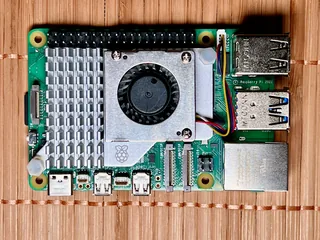
Raspberry Pi 5 (4GB)
Why this model
- 2–3× the performance of Pi 4 at the same price — makes chart rendering and OpenCPN scrolling genuinely smooth
- Dedicated PCIe lane enables NVMe SSD upgrade path
- 4GB is sufficient for OpenPlotter + Signal K + OpenCPN with headroom; 8GB only matters if you're layering on Node-RED, Grafana, InfluxDB
- Wide OS support — official OpenPlotter images exist for Pi 5 specifically
- Runs cooler than Pi 4 when properly heatsunk with the active cooler
Trade-offs
- Requires the new 27W USB-C PSU — older Pi power bricks won't deliver enough current
- Runs warm, needs the active cooler (not optional for sustained load)
- Availability has been spotty since launch; expect occasional backorders
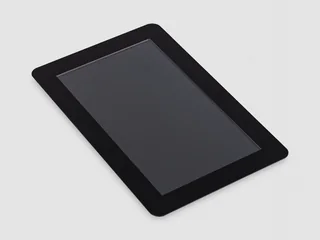
Raspberry Pi Touch Display 2 (7")
Why this display
- Uses the Pi's DSI ribbon port — no HDMI cable, cleaner install (power comes from a short GPIO lead)
- Capacitive multi-touch works well with OpenCPN's touch UI mode
- First-party Raspberry Pi product; Raspberry Pi commits to producing it until at least January 2030
- Swappable bezel / mount options via the OpenPlotter community
- Ships with ribbon cables for both the Pi 5 and older Pis — the original 7" display needs a separate cable for a Pi 5
Trade-offs
- An indoor panel — dim in direct sunlight, so plan for belowdecks or a shaded nav station
- Native portrait panel — add one line to the Pi's boot config to rotate it to landscape
- 7" is small for a dedicated helm chartplotter; read-while-standing distance required
- Not waterproof; needs a dry installation or an enclosure
- For sun-readable outdoor use, consider the optional 10" sun-readable upgrade (+$300)
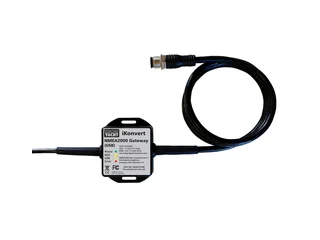
Digital Yacht iKonvert (USB)
Why this gateway
- The reference hardware for Signal K Node Server — compatibility is gold-standard
- CanBoat library supports iKonvert out of the box; used in every serious DIY build
- RAW mode exposes every NMEA 2000 PGN, giving developers full control
- Galvanic isolation protects the Pi from boat ground-loop issues
- DIP-switch mode selection — no configuration app needed
Trade-offs
- USB only — no Wi-Fi, so one Pi = one reader (no phones or tablets without a software bridge)
- Short integral USB cable; extension needed for most installs
- Alternative: the Yacht Devices YDWG-02 (Wi-Fi) if you want phone/tablet access too — see the gateway guide
What you don't need
A few things you'll see in other guides that are genuinely optional:
A chart package
OpenCPN reads free NOAA charts (US waters), free OpenSeaMap tiles (global), and most raster formats. You don't need to buy C-MAP or Navionics chips. That said, if you boat outside US waters, a $50 Navionics subscription or the free OpenSeaMap/OSM charts will serve you well — but it's a software decision, not a hardware one.
A fan
The Pi 5's active cooler includes a small fan. For a boat cabin install, passive aluminum cases plus the active cooler are enough. A separate case fan is overkill and adds failure points.
An UPS hat immediately
You'll eventually want one — losing power mid-write is how SD cards get corrupted — but for the first build, wire the Pi to a switched 12V-to-USB-C converter. Add a UPS later when you know the setup is keeping you happy.
Three monitors
One at the helm, one below, one at chart. The beauty of Signal K is that any phone, tablet, or laptop on the boat's Wi-Fi becomes a display. Build the base station first. Decide later whether additional screens are worth the complexity.
How the stack fits together
OpenPlotter isn't really one program — it's a distribution, a custom Raspberry Pi OS image with a curated set of marine tools pre-installed and pre-configured. The three that matter most:
- Signal K Node Server — the data hub. Pulls data off your gateway, normalizes it into Signal K's modern JSON format, and makes it available via HTTP/WebSocket/TCP to anything that wants it.
- OpenCPN — the chartplotter application. Shows charts, draws AIS targets, plans routes. Reads data from Signal K (since OpenCPN 5.2).
- The OpenPlotter settings apps — a set of small GUI utilities for configuring the gateway connection, network, sensors, and Signal K. The reason you install OpenPlotter instead of doing this by hand is to avoid wrestling with a hundred config files.
    NMEA 2000 BUS
    (your boat's instruments)
          │
          ▼
    ┌──────────────┐
    │  iKonvert    │  USB gateway
    │  (or YDWG-02)│
    └──────┬───────┘
           │  USB or Wi-Fi
           ▼
  ┌─────────────────────────────────┐
  │       Raspberry Pi 5            │
  │                                 │
  │  ┌──────────┐    ┌──────────┐  │
  │  │ Signal K │ →  │ OpenCPN  │  │
  │  │  Server  │    │  5.10    │  │
  │  │ :3000    │    │          │  │
  │  └────┬─────┘    └──────────┘  │
  │       │  WebSocket / TCP       │
  └───────┼─────────────────────────┘
          │
          ▼  over boat Wi-Fi
   ┌────────────────┐
   │ Phones, tablets│ ← dashboards,
   │ remote laptops │   charts, apps
   └────────────────┘
The key insight: Signal K is the single source of truth. Every piece of marine data enters the system through Signal K and every display pulls from it. OpenCPN isn't reading the gateway directly — it's reading Signal K. Your phone's dashboard app isn't reading the gateway either. This keeps things clean and means you can add new displays later without rewiring the whole stack.
The build, step by step
Flash the OpenPlotter SD card
Download Raspberry Pi Imager on your regular computer (not the Pi): raspberrypi.com/software. Install it.
Download the OpenPlotter Headless image from the OpenPlotter docs. We recommend Headless for a first install — it boots straight to a Wi-Fi hotspot and you configure everything from a web browser instead of messing with a keyboard on a Pi. The other editions (Starting, DSI Touchscreen) are fine too, just a different first-run experience.
Insert your microSD card into your computer. Open Pi Imager. Click "Choose OS" → scroll down → select "Use custom" → point at the OpenPlotter .img.xz file you downloaded. Click "Choose Storage" → pick your SD card. Click "Next" → answer "No" to custom settings (OpenPlotter comes pre-configured; overriding username/password breaks things). Click Yes to confirm the write. Takes 5–10 minutes.
Boot the Pi for the first time
Insert the flashed SD card into the Pi. Plug in the USB-C power supply. No monitor needed if you're using the Headless image — the Pi boots to a Wi-Fi hotspot.
Wait 90 seconds for first boot (OpenPlotter expands its filesystem on first run, which takes a minute). Then on your laptop or phone, look for a Wi-Fi network called openplotter. Connect using the password 12345678.
The default Wi-Fi password 12345678 is published in every OpenPlotter guide on the internet. Leaving it is fine for bench setup but change it before the Pi ever sees your boat's real network. We do this in the OpenPlotter settings app below.
Once connected to the openplotter hotspot, open a browser to http://10.10.10.1. You should see the OpenPlotter web interface. If you get a timeout, wait another minute; the Pi may still be finishing first boot.
Initial OpenPlotter configuration
In the web interface, go to Settings → Network. Do these three things in order:
- Change the hotspot password to something sensible (12+ characters, random is best)
- Switch the Wi-Fi mode to Hotspot + Client, which lets the Pi serve its own hotspot while also connecting to your boat's existing Wi-Fi (for internet access during setup)
- Add your boat's (or home's, for now) Wi-Fi SSID and password as the client network
Reconnect your laptop to the openplotter hotspot with the new password. Then go to Settings → Raspberry and set:
- Timezone to match where your boat is
- Hostname (optional; defaults to
openplotter) - SSH enabled if you want to shell into the Pi (we recommend yes)
Install Signal K Server
OpenPlotter ships Signal K as an installer app, not pre-installed. Go to Signal K Installer in the apps list. Click Install. Wait — this takes 5–10 minutes and installs Node.js, the Signal K server, and the default plugins.
When it finishes, click the checkbox to enable Signal K at boot. Then click Start. The Signal K admin UI is now available at http://10.10.10.1:3000.
Visit that URL in a new browser tab. You'll be prompted to create an admin user — do it, remember the password. This is the main Signal K dashboard; you'll be back here a lot.
Connect your NMEA 2000 gateway
Here's where the hardware meets the software. Plug the iKonvert's USB cable into any USB port on the Pi. Plug the iKonvert's NMEA 2000 drop cable into a free T-connector on your boat's backbone. Power up the N2K bus.
Back in the OpenPlotter web interface, go to Serial. You should see the iKonvert detected as a new device (it appears as ttyUSB0 or similar). Give it a short alias like ikonvert, set the format to NMEA 0183, and click Apply.
Go to Connections. Select your newly-aliased device from the list. Click Add to Signal K. In the dialog that pops up, click AUTO — OpenPlotter will create the Signal K connection using sensible defaults. Click Apply.
Open the Signal K admin UI (http://10.10.10.1:3000). Go to Dashboard → Data Browser. You should see live values streaming — GPS position, speed, heading, whatever your N2K bus is providing. If you see nothing, check that:
- The iKonvert's LED is lit (proves it's powered)
- The NMEA 2000 bus has a power tee with 12V applied (common gotcha)
- Your boat actually has devices broadcasting data — a cold bus with the engine off may have very little
Install OpenCPN
OpenCPN is also an installer app on OpenPlotter. Go to OpenCPN Installer → click Install. This takes 3–5 minutes.
Once installed, OpenCPN appears in your Pi's application menu (if you're using a monitor on the Pi directly) or you can launch it remotely through VNC. For the first setup, plugging the Pi into a monitor via HDMI is by far the easiest.
Connect OpenCPN to Signal K
Launch OpenCPN. Go to Options → Connections (the wrench icon, then the Connections tab). Click Add Connection. Configure:
- Type: Network
- Protocol: Signal K
- Address:
localhost - DataPort:
3000 - Uncheck "Automatic server discovery"
Click Apply, then OK. OpenCPN restarts its data subsystem and should immediately show your boat icon at your actual GPS position on the chart. If nothing appears, see the first-run troubleshooting section below.
Download charts
For US waters, the simplest option is the o-charts_pi plugin or direct NOAA downloads. OpenCPN's built-in chart downloader (Options → Charts → Chart Downloader) handles NOAA directly and is the fastest way to get current.
For other regions, OpenSeaMap (free, community-maintained, based on OpenStreetMap marine tags) is the best free option. Navionics charts via subscription ($50–100/yr) are also supported via the o-charts.org plugin.
Download charts for your cruising area. The Pi 5 with 64GB SD can comfortably hold several thousand charts. Once downloaded, go to Options → Charts → Chart Files → Add Directory → point at the chart folder. Click Update.
First run: making sure data actually flows
The most common failure mode for a first-time builder is "everything installed, but OpenCPN doesn't show my boat." Here's the checklist we run through every time:
Verify Signal K is receiving data
Open http://10.10.10.1:3000 → Data Browser. You should see a tree of live values. If this is empty:
- Check Server → Connections. The iKonvert connection should be green and showing a packet rate.
- If red or gray, check Server → Data Connections log. Look for errors about serial port permissions — common on first install.
- Run
ls -l /dev/ttyUSB*from an SSH session. The iKonvert's serial device must be readable by thepiuser. OpenPlotter handles this automatically but occasionally needs a reboot.
Verify OpenCPN sees Signal K
In OpenCPN, bring up Options → Connections. The Signal K connection should show a small green icon and a non-zero rx/tx count. If not:
- Confirm the port is
3000, not3443(the secure one, which needs certs configured) - Try
127.0.0.1instead oflocalhostif you get DNS resolution issues - Restart OpenCPN — the Signal K connector sometimes doesn't re-initialize after a config change until restart
If you're bench-testing the Pi indoors, your NMEA 2000 GPS has no satellite lock. Signal K will have position data slots defined but they'll be empty or showing stale values from the last time the GPS saw sky. OpenCPN won't draw your boat icon without valid coordinates. Take the Pi outside or use openplotter-tools to feed fake GPS data for testing.
OpenCPN configuration that matters
OpenCPN has roughly six hundred settings. Most can be left alone. A few are worth changing on first use:
Under Options → Display → General
- "Enable touch screen interface" if you're using the 7" Pi touchscreen — tap targets enlarge
- "Full Screen Toolbar" unchecked if your screen is 7" — the toolbar eats too much real estate otherwise
Under Options → Ships → AIS Targets
- "Show AIS target tracks" on — useful for spotting stopped vs moving vessels at a glance
- "CPA/TCPA alert" on with defaults — warns when a close-passing vessel is imminent
Under Options → Ships → Own Ship
- Set your boat's size dimensions properly (length, beam, draft). This shows your actual outline on the chart, not a generic arrow.
- Under "Heading Predictor," turn on heading predictor and set it to "VMG based on boat speed" — shows where you'll be in 6 minutes
Under Plugins
OpenCPN has a genuinely excellent plugin ecosystem. A few we recommend turning on right away:
- DashT — dashboard overlay with engine/wind/depth gauges, pulling directly from Signal K
- WMM — World Magnetic Model, corrects your compass readings. On by default on new installs.
- Weather_Routing — GRIB-based route optimization. Niche but delightful.
- Squiddio — shared routes and waypoints with other OpenCPN users
Adding a phone or tablet as a remote display
Signal K's killer feature: anything with a web browser on your boat's Wi-Fi can display your data. No app install needed.
From your phone, while connected to the openplotter hotspot (or your boat's Wi-Fi if you've joined the Pi to it), open http://10.10.10.1:3000. You'll see the Signal K admin dashboard. But there's more:
- Web-based instruments —
/@signalk/instrumentpanelgives you configurable gauge layouts. Build a wind/speed/depth panel, pin it to your iPad's home screen, and it behaves like a native app. - Freeboard-SK — a proper web chartplotter that runs entirely in the browser. Install it from the Signal K Appstore (Admin UI → Appstore → install
freeboard-sk). Works on phones and tablets. - Native apps that speak Signal K — iNavX, SEAiq, Aqua Map, and several others connect directly to Signal K over your boat's Wi-Fi and use its data the same way OpenCPN does.
For a cruising couple, a typical setup is: the Pi + 7" touchscreen mounted at the nav station showing OpenCPN, and an iPad at the helm showing Freeboard-SK or an instrument panel. Both are reading the same Signal K server, both always in sync, neither needs internet.
If you want to pull Signal K History API data out for analysis — engine trends over a season, depth profiles by anchorage, wind statistics on a passage — signalk-cli is a free, open-source Python utility a reader surfaced on r/smartboats. It walks the available data paths, auto-aggregates series like depth and wind speed, and handles position data correctly so you don't end up with averaged latitudes that mean nothing.
We haven't bench-tested it ourselves — treat it as a community pointer rather than an endorsement. But if you've gotten this far in the build, you're the audience for it.
The realistic limitations
No guide should oversell. A few things this stack genuinely doesn't do well compared to a commercial MFD:
Sunlight readability
The official Pi touch displays are indoor panels (the original 7" is rated 250 cd/㎡; Raspberry Pi doesn't publish a figure for the 7" Touch Display 2). An MFD is 1,000+ cd/㎡. In direct sun, the Pi display becomes a mirror. The fix is a sun-readable marine monitor at 10–12" for $300–400, which pushes the build cost up to roughly where a low-end dedicated chartplotter starts. Be realistic about where the Pi screen will actually live.
Waterproofing
The Pi, its case, and the screen are not waterproof. A $40 Garmin or Raymarine MFD enclosure is rated to IPX7 and can be hosed down. If your boat gets truly wet inside — open cockpit, spray, leaks around the companionway — the Pi needs a real waterproof enclosure (custom fabricated, $100+) or you need to mount it belowdecks.
Boot time
Raspberry Pi 5 with SD card cold-boots OpenPlotter in about 45 seconds. A Garmin MFD cold-boots in 15. This is annoying mostly the first time of the day, but if you lose power mid-trip you'll notice the minute before charts come back up. Moving to NVMe SSD cuts the boot time roughly in half.
Support when it breaks
If your MFD dies, you call the manufacturer. If your OpenPlotter breaks, you post on the OpenMarine forum. The community is helpful and the responses are thorough, but you're not getting a same-day warranty replacement. Keep a backup SD card with a tested OpenPlotter image; it's the cheapest insurance on the boat.
SD cards are the weakest link in a Pi build. Power outages during write operations can corrupt them beyond recovery. Use the built-in "SD Card Copier" tool (under Accessories on the Pi desktop) to clone the working SD card to a second one every week or two, at least until you move to an NVMe SSD. A $15 spare card that boots when the primary dies will save you a haul-out.
Where to go from here
Once the base stack is running reliably, the fun part starts. Four directions worth exploring:
Long-term data logging
Install InfluxDB and Grafana via the Signal K plugin marketplace. Suddenly you have a real database of every piece of boat data — battery voltage trends over a season, engine hours, fuel burn, wind patterns. This is where an open-source stack starts to pull ahead of commercial MFDs: a Raymarine will show you your battery voltage right now, but it won't draw you a three-month graph of how your battery bank has been degrading.
Home Assistant integration
Signal K has a Home Assistant plugin that makes all your boat data available to home-automation dashboards. This is especially useful if you run Home Assistant for your house anyway — your boat becomes just another room with sensors.
Custom alerts
The Signal K notifications plugin lets you create arbitrary rules. Bilge on more than 30 seconds? Push notification to your phone. Battery below 12.0V? Email alert. Wind exceeds 25 knots at anchor? Sound the siren. The rule language is JSON and lightweight enough that non-programmers can handle it with a template from the forum.
A proper custom dashboard
Node-RED (included in OpenPlotter) gives you visual flow-based programming for building custom dashboards. Design a single-screen "departure checklist" display that shows battery voltage, fuel level, engine temp, AIS target count, and weather GRIBs all at once. Most builders eventually make something like this and wonder why the factory-built MFDs don't offer it.
Frequently asked questions
Do I need to buy a chart package like C-MAP or Navionics for an OpenCPN chartplotter?
No. OpenCPN reads free NOAA charts for US waters, free OpenSeaMap tiles globally, and most raster chart formats. A Navionics subscription is optional for non-US cruising at around $50/year, but it's a software decision, not a hardware requirement.
How does an open-source Raspberry Pi chartplotter compare to a commercial MFD in sunlight?
The official Raspberry Pi touch displays are indoor panels. Raspberry Pi doesn't publish a brightness figure for the 7-inch Touch Display 2 (the 5-inch version is rated 500 cd/m2 and the original 7-inch display 250 cd/m2), while a commercial MFD is 1,000+ cd/m2, so the Pi screen becomes a mirror in direct sun. A sun-readable marine monitor at 10 to 12 inches costs $300 to $400, which pushes the total build cost close to a low-end dedicated chartplotter.
Is a Raspberry Pi chartplotter waterproof?
No. The Raspberry Pi, its case, and the official touchscreen are not waterproof. A commercial MFD is rated to IPX7 and can be hosed down. For wet installs you need a custom waterproof enclosure starting around $100, otherwise mount the Pi belowdecks.
How long does a Raspberry Pi chartplotter take to boot?
A Raspberry Pi 5 with a microSD card cold-boots OpenPlotter in about 45 seconds, versus around 15 seconds for a Garmin MFD. Moving to an NVMe SSD cuts the Pi boot time roughly in half.
What does a Raspberry Pi 5 OpenPlotter chartplotter build cost?
A complete new-hardware build with Raspberry Pi 5, official 7-inch Touch Display 2, Digital Yacht iKonvert NMEA 2000 gateway, microSD card, case, cooler, and power supply totals about $455. If your boat already has a Wi-Fi NMEA 2000 gateway, you can skip the iKonvert and bring the build down to around $230. All software (OpenPlotter, Signal K, OpenCPN) is free.
The short version
A $400–500 Raspberry Pi chartplotter build with OpenPlotter, Signal K, and OpenCPN gives you most of what a commercial MFD offers — charts, AIS, routing, instrument displays — plus extensibility, programmability, and no subscription fees that commercial platforms simply won't match. It's not the right pick if you want plug-and-forget simplicity, but for a boater who's comfortable with a terminal and wants to own the stack, it's the best $400 you'll spend on your boat. The build takes 3–5 hours, costs less than one West Marine restock run, and the skills transfer: once you know OpenPlotter, you can rebuild it in 30 minutes after a dead SD card.