What an NMEA 2000 gateway actually is
Quick vocabulary, because the marine-electronics world is full of jargon that nobody explains to first-time buyers. NMEA 2000 (often abbreviated N2K) is the communication standard that modern marine electronics use to talk to each other. Your chartplotter, engine sensors, depth transducer, wind instrument, AIS receiver — if they're from this decade, they're probably on an NMEA 2000 network. Under the hood it's a CAN bus running at 250 kbit/s, which is a fancy way of saying "a robust serial network designed for industrial environments," but you don't need to care about that.
What you do need to care about: your phone, PC, and Raspberry Pi cannot speak NMEA 2000 natively. A laptop has USB, Ethernet, and Wi-Fi. A tablet has Wi-Fi and Bluetooth. A Raspberry Pi has everything but no NMEA 2000 port. So if you want any non-marine device to read the data flowing around your boat — speed, heading, GPS, wind, depth, engine RPM, fuel level, tank status, AIS targets — you need a translator.
That translator is a gateway. It plugs into your NMEA 2000 network on one side, and on the other side it speaks a protocol that phones, PCs, and microcomputers understand — usually Wi-Fi, USB, or Ethernet. The gateway reads the binary PGN messages on the N2K bus, optionally converts them to something friendlier (NMEA 0183 text, Signal K JSON, or raw PGN data), and makes them available over whatever connection type you chose. For how Wi-Fi, cellular, and Starlink fit together aboard, see our marine internet stack guide.
The decision that matters most: connection type
There are three connection types to choose from, and getting this right is 80% of getting the purchase right. Here's the decision tree:
Which connection type do you need?
For the overwhelming majority of beginners — which is to say, anyone on a boat smaller than 50 feet who wants to see their N2K data on a phone or iPad — Wi-Fi is the right answer. Every modern navigation app supports it over TCP or UDP. No drivers to install, no USB cable running across your cabin, no single-device limitation. This is why it's our top pick.
     N2K BUS (your existing network)
  ┌─────┬─────┬─────┬─────┐
  │ MFD │ GPS │ Wind│Depth│
  └──┬──┴──┬──┴──┬──┴──┬──┘
     │     │     │     │
  ═══╧═════╧═════╧═════╧═══  backbone cable
                 │
                 ▼
          [ GATEWAY ]  ◀── powered from N2K
                 │
              Wi-Fi
                 │
        ┌────────┼────────┬────────┐
        ▼        ▼        ▼        ▼
      📱        💻        📟       🥧
     Phone    Laptop   Tablet   Pi
The NMEA 2000 Wi-Fi gateway option
An NMEA 2000 Wi-Fi gateway (sometimes written "nmea2000 wifi gateway") broadcasts your boat's bus data over a wireless network so any phone, tablet, or laptop can read it — no cable, no driver. This is the right choice for the vast majority of boat owners, and our top pick, the Yacht Devices YDWG-02, is exactly this type. It serves data over both TCP and UDP, so every mainstream navigation app connects in seconds.
The NMEA 2000 USB gateway option
An NMEA 2000 USB gateway is the cheapest and most reliable way to feed a single nearby computer — typically a Raspberry Pi running Signal K or a Mac/PC running chart software. One cable carries both power and data. If you're building a DIY navigation server, the USB version of the Digital Yacht iKonvert is the reference hardware for that job.
The NMEA 2000 Ethernet gateway option
An NMEA 2000 Ethernet gateway makes sense only when you have a dedicated navigation PC mounted some distance from the backbone, or an existing network of switches — common on larger vessels and fleet installs. Ethernet handles longer cable runs than USB and integrates cleanly with onboard networking, but for a boat under 50 feet it's overkill; default to Wi-Fi.
Top pick: Yacht Devices YDWG-02
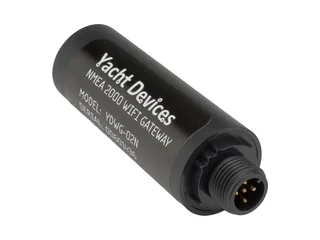
Yacht Devices NMEA 2000 Wi-Fi Gateway (YDWG-02)
What we like
- Dead-simple setup — creates its own Wi-Fi network or joins yours, no software needed
- Built-in web gauges let you see wind/depth/speed in a browser without any app
- TCP and UDP both supported simultaneously, unlimited UDP clients
- Bi-directional NMEA 2000 ↔ NMEA 0183 conversion included
- Compatible with almost every marine app — iNavX, Navionics, OpenCPN, TimeZero, Aqua Map, SEAiq
- Works with Signal K when paired with an app or server that speaks it
- Sold in two plug versions — YDWG-02N (NMEA 2000 / DeviceNet Micro male) and YDWG-02R (Raymarine SeaTalk NG) — so no adapter hunting if you order the right one
What could be better
- $249 isn't cheap in absolute terms, though it is now the lowest-priced gateway of the three
- Wi-Fi range is roughly 30m open air — fine on most boats, not a superyacht solution
- Documentation is technically correct but translation-quality English can be terse
- Cloud Service is a bonus feature but not as polished as commercial competitors
Yacht Devices makes the gateway we'd buy for our own boat if we were doing this for the first time. It is no longer more expensive than the USB alternatives — at $249 vs ~$260 for the iKonvert it is now the cheaper of the two, and it buys you more flexibility. Your phone connects to it. Your tablet connects to it. Your laptop connects to it. Your guests' phones can connect to it (if you share the password). You don't need a computer running somewhere for the data to be accessible — the gateway is its own tiny web server.
The setup process is genuinely five minutes: plug it into your N2K backbone (it draws power from the bus — no separate wiring), wait for the blue LED to settle, find the "YDWG-02" network in your phone's Wi-Fi list, open a browser to 192.168.4.1, and you're looking at live engine data, wind, position, everything. From there you can reconfigure it to join your boat's existing Wi-Fi instead of making its own network, which is what most people end up doing.
What it works with
The YDWG-02 speaks two protocols at the output end: NMEA 0183 (over TCP or UDP) for compatibility with mainstream chartplotter apps, and a RAW binary mode for passing full NMEA 2000 PGNs through to apps that can decode them. The short list of apps that work beautifully with it:
- Navionics Boating — the most popular cruiser app, works over TCP
- iNavX — the expedition-grade iPad app, supports both protocols
- OpenCPN — free, open-source, cross-platform; our Learn guide covers setup
- TimeZero / Nobeltec — pro-grade PC navigation, uses the RAW protocol
- SEAiq Open — yacht-friendly iPhone/iPad nav app
- Signal K Node Server — runs on Raspberry Pi or any Linux box, connects over UDP
- Aqua Map — the Garmin/NOAA chart app many cruisers use
For Signal K and developers: Digital Yacht iKonvert
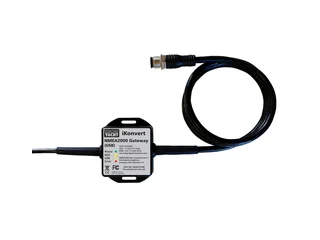
Digital Yacht iKonvert (USB or ISO variant)
What we like
- Compatible with CanBoat and the Signal K Node Server out of the box
- RAW mode exposes every NMEA 2000 PGN bidirectionally — ideal for developers
- FTDI USB chip has the best driver support across Windows/Mac/Linux/Android
- DIP-switch mode selection — no configuration software, no firmware flash
- Compact housing, integral USB cable, integral N2K drop cable
- Full galvanic isolation protects your PC if the boat has ground-loop issues
What could be better
- USB limits you to one device at a time — no phones, no remote access
- Raspberry Pi needs to be physically near the gateway (USB cable lengths are short)
- The DIP switches inside the housing are awkward to access if you want to change modes
- No built-in gauges or web interface — you must provide the software
The iKonvert is the gateway you want if you're building a Signal K / OpenPlotter setup on a Raspberry Pi. The Signal K Node Server documentation uses the iKonvert as its reference example. The CanBoat project — the open-source toolkit everyone in the Signal K community uses — has first-class iKonvert support. If your plan is "Pi under the helm, running Grafana dashboards from boat data, feeding a custom app I'm writing," this is the right gateway.
It's the most direct way to get proper NMEA 2000 data into a computer. At around $260 it no longer undercuts the Wi-Fi gateway — the two now sit within about $10 of each other. If your whole plan is "Raspberry Pi next to the bus, done," the native Signal K support still makes it the right pick, and you don't lose anything you'll actually use. The moment you want data on a phone, though, you need either a second gateway or a software bridge running on the Pi — at which point the Wi-Fi gateway would have been simpler.
Digital Yacht makes two iKonvert variants: the standard USB version and the ISO version. The ISO version outputs to an RS-422 differential pair instead of USB — it's meant for industrial/integrator installations where you're wiring the gateway into a broader electrical system. For anything involving a normal PC or Pi, you want USB. They cost the same, so this isn't a money decision, just a "don't get the wrong part number" note.
For legacy 0183 or pro installs: Actisense NGX-1
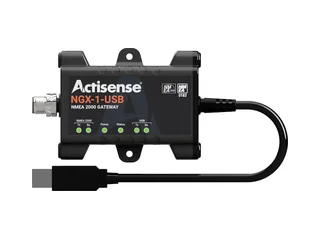
Actisense NGX-1 Dual Gateway (USB)
What we like
- The most comprehensive NMEA 0183 → NMEA 2000 conversion library on the market
- Works as both a PC interface AND a 0183 converter — two gateways in one
- Free Actisense NMEA Reader software gives you serious diagnostics
- Industry-standard brand — what many professional installers specify by default
- Compatible with TimeZero, Expedition, OpenCPN, and Actisense Toolkit
- Replaces the legacy NGT-1 and NGW-1 in one product
What could be better
- Make sure you order the NGX-1-USB: Actisense also sells an NGX-1-ISO, which swaps the USB plug for a bare-wire, opto-isolated serial cable for NMEA 0183 or RS-232/RS-422 devices
- The NGX-1 has no Wi-Fi — but Actisense now offers the W2K-2 and WGX-1 Wi-Fi gateways if you want wireless access to your boat data
- Signal K support is workable but not as first-class as the iKonvert
- More expensive than the iKonvert for the same USB function
- Configuration software is a bit dated visually (though it works fine)
The Actisense NGX-1 is the pro's choice, particularly for boats that have a mix of old NMEA 0183 instruments and new NMEA 2000 gear. Its 0183 conversion library is the deepest available — Actisense has been maintaining it for decades, and edge cases that break cheaper converters tend to work here. If your project list includes "connect my old Raymarine ST60 instruments to my new Garmin chartplotter" or "keep the ancient autopilot talking to the new AIS," this is the gateway.
The NGX-1 is also what you'll find recommended by most professional installers and in most boatyards' standard specs. That brand weight is real — you can call Actisense support in the UK and get answers from engineers who know every PGN in the NMEA 2000 spec. The iKonvert and YDWG-02 are fine products, but neither has the same depth of institutional support behind them.
The single biggest reason not to pick the NGX-1 for a beginner install: it has no Wi-Fi. If you want your phone to see the data, you need additional hardware. Actisense does make Wi-Fi gateways (the W2K-2 and WGX-1, below), but the NGX-1 itself is a hardwired product aimed at professional installers who want wired reliability. For a phone-first beginner, it's a limitation.
- W2K-2 — NMEA 2000 to Wi-Fi. Streams your N2K data to any phone, tablet, or laptop over Wi-Fi. The simpler option if you just need wireless data viewing.
- WGX-1 — NMEA 0183 + NMEA 2000 to Wi-Fi with bi-directional conversion. Recent firmware added built-in NMEA dashboards with real-time analysis, diagnostics, and voyage performance — all from a browser on your phone. If you need Actisense conversion quality plus wireless access in one box, this is worth a serious look.
See Actisense's own gateway buyer's guide for a full comparison across their product line.
The one spec detail most beginners get wrong
There's one purchase mistake that shows up constantly on boat forums, and it's not about which gateway to pick. It's about connectors.
NMEA 2000 is a standard — but the physical plug that connects to it isn't always the same. Three common variants exist:
- DeviceNet Micro (the "standard" N2K plug) — five-pin, threaded, what Garmin and most generic N2K gear uses. This is the default.
- Raymarine SeaTalk NG — functionally identical to NMEA 2000 but uses a different physical connector (smaller, white). Raymarine boats use this throughout.
- Simrad SimNet — yet another connector, physically incompatible with the others but electrically identical. Older Simrad gear uses it.
The wrong connector won't damage anything, but it won't plug in, either — and you'll be stuck ordering an adapter from a different vendor while your gateway sits in a drawer. Most gateways are sold in several connector versions (Yacht Devices offers the YDWG-02 as the N2K Micro YDWG-02N or the SeaTalk NG YDWG-02R; our Amazon link goes to the YDWG-02N), so verify before clicking buy. Look at the existing T-connectors on your backbone.
If your backbone is white Raymarine SeaTalk NG gear, pick the SeaTalk NG variant of the gateway or buy an A06045 SeaTalk NG-to-N2K adapter at the same time. If it's standard N2K everywhere, you're fine with the default gateway SKU.
Good news: all three connector systems carry the same electrical signal. An adapter cable ($15–25) bridges any of them. But it's one more part to order, so catch it in the shopping cart, not the installation stage.
Side-by-side comparison
Three gateways at a glance
| Yacht Devices YDWG-02 | Digital Yacht iKonvert | Actisense NGX-1 | |
|---|---|---|---|
| Price | $249 | ~$260 | ~$276 |
| Connection | Wi-Fi | USB | USB |
| Phone / iPad compatible | Yes | No | No |
| Multiple devices | Unlimited (UDP) | One | One |
| Signal K support | Via app/server | Native, reference | Workable |
| NMEA 0183 conversion | Bi-directional | Bi-directional | Most extensive |
| Built-in web gauges | Yes | No | No |
| Powered from N2K | Yes | Yes | Yes |
| Diagnostic software | Basic web UI | Third-party only | Actisense NMEA Reader |
| Warranty | 2 years | 2 years | 3 years |
What we'd skip
Generic "NMEA 2000 Wi-Fi" adapters from unknown brands
Amazon, AliExpress, and eBay are full of $80–$120 gateways with generic branding that claim NMEA 2000 compatibility. These are tempting. Some of them even work. But: support is non-existent, firmware updates rarely happen, driver problems show up in odd corners of the PGN spec, and when something breaks you're on your own. For a $100 saving, you're betting that your boat's data will stay readable for the life of the gateway. We wouldn't take that bet on a $50,000+ boat.
The older NGT-1 and NGW-1 from Actisense
These are the ancestors of the current NGX-1 — the NGT-1 was USB-PC only, the NGW-1 was 0183-converter only. The NGX-1 combines both into one product at roughly the same price as a single older unit. If you see the older SKUs discounted at a dealer, they still work, but the NGX-1 is the current generation and the one getting firmware updates.
MFD-brand proprietary gateways
Garmin, Raymarine, and Simrad all sell their own gateway products that plug into their MFDs and expose Wi-Fi or Ethernet. These work well if you're committed to that MFD ecosystem and only want to use their apps. But they're typically more expensive and less flexible than the standalone gateways in this guide. We'd skip them unless you specifically need Garmin's ActiveCaptain integration or Raymarine's app-over-LightHouse integration.
Installation basics
All three gateways are designed for installation by a capable boat owner, not only a professional. None of them require crimping, soldering, or precision drilling. Here's what you should expect:
What you need
- An existing NMEA 2000 backbone with a free T-connector port (or a T-connector you can add)
- A drop cable matching your network's connector type (usually included with the gateway)
- For USB gateways: a USB cable extension if the gateway can't physically reach the computer
- For Wi-Fi gateways: 30 minutes to configure SSIDs and passwords
The process, roughly
- Power down the NMEA 2000 network (turn off the master switch or pull the fuse — there's usually one at the power tee)
- Add a new T-connector to the backbone if all existing ports are used
- Plug the gateway's drop cable into the T-connector
- Power the network back on
- For Wi-Fi gateways: find the gateway's SSID, connect, configure
- For USB gateways: plug into your computer, wait for driver auto-install (Windows/Mac handle this automatically; Linux usually does too)
- Open your navigation app, point it at the gateway's IP address (Wi-Fi) or serial port (USB), start seeing data
Total time: 20 minutes for someone who's comfortable with cables, up to an hour if this is your first time working with NMEA 2000. The trickiest part is usually figuring out which T-connector to insert into — your boat's factory install may not have documented it well. When in doubt, any spare T on the backbone works identically.
NMEA 2000 drop cables (the branch that connects a device to the main backbone) are limited to 6 meters by the spec. In practice, keep them under 3m — every extra meter adds noise susceptibility. If you need the gateway 20 feet from the backbone, run the backbone to where the gateway will live instead of running a long drop cable.
Which apps to use with each gateway
Picking the right app matters as much as picking the right gateway — a $249 Wi-Fi gateway feeding the wrong app gives you less value than a ~$260 USB gateway feeding the right one. Short compatibility list:
For phones and tablets (Wi-Fi gateway required)
- Navionics Boating — the default for casual cruisers. Connects to any NMEA 0183 TCP/UDP stream, which means every gateway in this guide.
- iNavX — more serious sailing/expedition use. Beautiful chart rendering, proper routing.
- Aqua Map — Garmin-owned, includes NOAA and Navionics charts. Solid NMEA support.
- SEAiq Open — yacht-oriented, handles large AIS target counts gracefully.
For PCs and Macs
- OpenCPN — free, cross-platform. Works with USB or Wi-Fi gateways. Plugin ecosystem is deep.
- TimeZero / Nobeltec — serious sport-fishing and expedition PC software. Supports NMEA 2000 directly through the iKonvert or NGX-1 in RAW mode.
- Expedition — racing program of record. Expensive, extraordinary.
- Coastal Explorer — gentler learning curve than Expedition.
For Raspberry Pi / home-lab setups
- Signal K Node Server — the hub of any serious DIY boat-data project. The iKonvert is the reference hardware.
- OpenPlotter — Pi distribution that bundles Signal K, OpenCPN, and a full stack. Our Learn page covers setup.
- CanBoat — the low-level library that Signal K sits on. Useful if you're writing custom code.
- Grafana + InfluxDB — pair with Signal K for proper dashboards showing engine trends, battery curves, tank levels over months. See also our guide to Home Assistant on a boat.
When we'd update this pick
We'd revisit this guide when:
- Actisense ships a Wi-Fi gateway — which would likely move the Actisense pick to our top spot because of the brand's support depth
- Yacht Devices updates the YDWG-02 with a next-generation model (YDWG-03?) with better Wi-Fi range
- A reliable USB-C version of any gateway ships — modern laptops are phasing out USB-A and right now every gateway in this guide ships USB-A
- Signal K 2.0 or equivalent standard changes what gateways need to support — this seems unlikely in the next year but worth watching
- A new entrant ships genuine ChatGPT-style natural-language querying of NMEA 2000 data — that's the next frontier in this category, we're keeping an eye out
Frequently asked questions
What is an NMEA 2000 gateway?
An NMEA 2000 gateway is a translator that plugs into your boat's NMEA 2000 (N2K) network on one side and speaks Wi-Fi, USB, or Ethernet on the other side, so phones, PCs, or a Raspberry Pi can read live boat data like GPS, wind, depth, AIS, and engine RPM.
Which NMEA 2000 gateway is best for beginners in 2026?
For most beginners the Yacht Devices YDWG-02 Wi-Fi gateway is the best choice — about $249, draws power from the N2K bus, sets up in five minutes, and lets any phone, tablet, or laptop see live boat data without drivers or extra software.
Do I need a Wi-Fi NMEA 2000 gateway or a USB one?
Pick Wi-Fi if you want to see data on a phone or tablet — phones have no USB port for marine gateways. Pick USB if the gateway will feed a Raspberry Pi running Signal K or a PC sitting near the bus; USB is cheaper and more reliable for one nearby computer.
Will an NMEA 2000 gateway work with SeaTalk NG or SimNet?
Yes — SeaTalk NG (Raymarine) and SimNet (older Simrad) are electrically identical to NMEA 2000 DeviceNet Micro and only use a different physical plug. An adapter cable ($15-25) bridges them, and Yacht Devices sells its gateways in versions with different plugs (the YDWG-02 comes as the N2K Micro YDWG-02N or the SeaTalk NG YDWG-02R).
Is the Digital Yacht iKonvert the best gateway for Signal K?
Yes — the Digital Yacht iKonvert is the reference hardware for the Signal K Node Server and CanBoat project. Its RAW mode exposes every NMEA 2000 PGN bidirectionally, and its FTDI USB chipset has the best driver support across Windows, macOS, Linux, and Android.
What does the Actisense NGX-1 do that other gateways don't?
The Actisense NGX-1 has the deepest NMEA 0183 to NMEA 2000 bidirectional conversion library on the market and replaces both the legacy NGT-1 (PC interface) and NGW-1 (0183 converter) in one product. It is the gateway most professional installers specify by default.
How long does it take to install an NMEA 2000 gateway?
About 20 minutes for a boat owner comfortable with cables, up to an hour first-time. You power down the bus, add a free T-connector, plug in the gateway's drop cable, power up, and connect from your phone or computer — no soldering or crimping required.
What is the best NMEA 2000 Wi-Fi gateway?
The Yacht Devices YDWG-02 is the best NMEA 2000 Wi-Fi gateway for most boats — it creates its own wireless network or joins yours, serves live N2K data over TCP and UDP to phones, tablets, and laptops, and works with virtually every marine app. It's our overall top pick at about $249.
What is the best NMEA 2000 USB gateway?
For a USB NMEA 2000 gateway, the Digital Yacht iKonvert (USB version) is the strongest choice. Its RAW mode and FTDI chipset make it the reference hardware for Signal K and CanBoat on a Raspberry Pi, with solid driver support on Windows, macOS, Linux, and Android. The Actisense NGX-1 is the pro-grade USB alternative when you also need deep NMEA 0183 conversion.
Is there an NMEA 2000 Ethernet gateway?
Yes. An NMEA 2000 Ethernet gateway feeds boat data to a wired network and is worth considering only when you have a dedicated nav PC far from the backbone or an existing onboard switch network — typical on larger vessels. For most boats under 50 feet a Wi-Fi gateway is simpler and more flexible.
The short version
If you want to see your boat's data on a phone or tablet — and you probably do — buy the Yacht Devices YDWG-02. It's $249 at major marine retailers, sets up in five minutes, and works with every mainstream navigation app. If you're a developer building on a Raspberry Pi or running Signal K, buy the Digital Yacht iKonvert (USB version) — it's the reference hardware for that world and saves you $30. If you're integrating legacy NMEA 0183 equipment or working with a pro installer, the Actisense NGX-1 has the deepest conversion library and the strongest institutional support. Everything else is a corner case.