Why subscriptions bother people
A reasonable cellular boat monitor costs between $150 and $250 per year in ongoing service. Over a decade of boat ownership, that's $1,500 to $2,500 — often more than the monitor hardware itself. It rolls forward indefinitely, whether you used the boat that month or not, and if you cancel the service during the off-season, you risk missing the exact scenarios the system was purchased to prevent (frozen hoses, winter flooding, off-season theft).
There's also a durability argument, which is subtler but more important. A subscription-based monitor is only as durable as the vendor's cloud infrastructure. When a vendor eventually shuts down — and some of them will — the hardware becomes a paperweight the same day the cloud goes dark. Even without a shutdown, service quality can drift: if a vendor reduces engineering investment during lean years, notification latency grows, the app stagnates, and the hardware on your boat doesn't change but the usefulness of it drops substantially.
A subscription-free system dodges both problems: no ongoing payment, and no single-vendor dependency that ends your monitoring capability when the company does. These are real advantages, and they're why the subscription-free segment exists.
But we want to be honest here. For most boat owners, the commercial subscription systems are still the right answer — the trade-offs of going subscription-free are significant, and for the average weekender they outweigh the cost savings. Before we get to the picks, we want to walk through the trade-offs clearly so you can make an informed choice.
The honest trade-off
Subscription-free monitoring means you give up some combination of:
- Push notifications over cellular data. Real-time push over 4G/5G LTE-M requires a server somewhere — either the vendor's cloud (the subscription model) or your own (the DIY model). Systems without either typically fall back to SMS, which is slower, more expensive per-message, and often less reliable.
- Cross-platform polish. Siren and Yacht Sentinel apps ship regular updates. Subscription-free apps typically don't — there's no recurring revenue to fund engineering, so they get minimal attention after launch.
- Vendor support. When you call a subscription company because your system is misbehaving, you talk to a support desk with incentive to fix it. When you have a problem with a no-subscription system, you get a community forum and a bit of luck.
- Out-of-the-box simplicity. Siren takes two hours to install. A DIY stack takes two weekends minimum, and a ZigBoat takes hours-not-minutes to configure properly.
- Coverage in remote areas. A roaming SIM from a premium vendor has better marina coverage than a prepaid BYO SIM because the vendor negotiated multi-carrier agreements you can't replicate as an individual.
If none of those trade-offs bother you, the subscription-free world is genuinely viable. If some of them do, you're probably better off paying the $225/year.
The top pick: Glomex ZigBoat
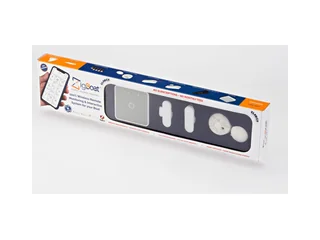
Glomex ZigBoat Starter Kit (ZB101)
What we like
- Genuinely zero subscription, forever — no cloud dependency, no monthly fees ever
- Lifetime warranty on the hardware — rare in this category
- Peer-to-peer communication means 100% data privacy (no cloud intermediary)
- ZigBee sensors have 3–5 year alkaline battery life — install and forget
- OEM-installed on Azimut, Beneteau, Jeanneau, Bavaria, Sea Ray — real boatbuilder credibility
- Starter kit includes bilge flood sensor, battery sensor, door sensor, and gateway
What could be better
- $999 starter kit is a high entry price compared to Siren 3's $300 hardware
- The older Pro Connected Kit (ZB106) uses a 3G module — for remote alerts, buy the 4G Link or 4G Connectivity Kit instead
- App is functional but visibly less polished than Siren's
- Remote alerts need the 4G Link plus your own SIM, and SMS isn't as fast or reliable as modern push notifications
- Local Wi-Fi monitoring only works when your phone is near the boat
Glomex ZigBoat is the only mainstream commercial monitor we've found that genuinely lives up to the "no subscription" promise. Most competitors that advertise themselves this way turn out to have hidden cloud fees, SMS-service costs, or app-store paywalls once you dig in. ZigBoat doesn't — the hardware talks to your phone over local Wi-Fi when you're aboard, and via ZigBee radio between the gateway and the sensors regardless of internet connectivity.
The architecture is worth understanding because it's the key to the no-subscription model. The ZigBoat gateway is a small 12V-powered hub that sits in your cabin and runs a local wireless mesh. The sensors — bilge probe, battery voltage, door/hatch, motion, smoke, and so on — talk to the gateway using ZigBee, a low-power wireless protocol designed for IoT devices with years-long battery life. When your phone is within Wi-Fi range of the gateway (i.e., you're on the boat or on the dock), you can see status and get push notifications directly.
For remote monitoring when you're away from the boat, you need a cellular connection on the gateway. ZigBoat's current route is the 4G Connectivity Kit (ZB104G) — a gateway, the ZigBoat 4G Link, a battery sensor and a bilge flood sensor — or the 4G Link (ZB212) on its own for an existing gateway. We couldn't find a published US price for either, so ask a dealer. You bring your own SIM from any carrier. When the gateway detects a critical event, it sends an SMS to your phone. This works globally, because you can swap the SIM for a local prepaid one when cruising internationally — no roaming fees, no vendor-negotiated coverage agreements, just whatever carrier is cheapest where you are.
What to buy: Starter or 4G?
The decision between the Wi-Fi-only Starter kit and a 4G-connected setup hinges on one question: will your phone be within Wi-Fi range of the boat regularly?
- Buy the Starter kit if: you live aboard, you walk past the boat daily, or the boat is in your backyard. The gateway's local Wi-Fi is enough, and you skip the cellular hardware and SIM.
- Buy the 4G Connectivity Kit if: the boat lives at a marina you visit weekly or less often, or you leave it for seasons at a time. The cellular module is the product.
Some older ZigBoat Pro inventory still ships with 3G GSM modules. 3G networks are being decommissioned globally — AT&T, T-Mobile, and Verizon all completed 3G shutdowns in 2022, and European carriers are on a rolling shutdown through 2028.
Glomex USA still lists the Pro Connected Kit (ZB106) with a GSM 3G module (at $999, the same price it lists for the Starter Kit), while ZigBoat's own catalog now offers a 4G Connectivity Kit (ZB104G) built around the ZigBoat 4G Link (ZB212, SIM not included). Before you buy any cellular ZigBoat kit, confirm the specific SKU ships with a 4G LTE module. If the product listing doesn't specify, email Glomex directly — they've been transitioning the product line but not all dealer inventory is current. A Pro kit with a 3G-only module is a waste of money in 2026.
Real three-year cost
The honest 3-year total for ZigBoat depends on whether you add a cellular connection:
ZigBoat 3-year total, honest accounting
| Configuration | Hardware | 3-yr service | 3-yr total |
|---|---|---|---|
| Starter kit (Wi-Fi only, on-boat monitoring) | $999 | $0 | $999 |
| 4G Connectivity Kit + cheapest prepaid SIM (US, ~$5/month) | Ask a dealer | ~$180 | Kit + ~$180 |
| 4G Connectivity Kit + MVNO IoT SIM (Hologram, Soracom, ~$2/month) | Ask a dealer | ~$72 | Kit + ~$72 |
A few honest observations: even the Wi-Fi-only Starter kit costs more up front than a Siren 3 ($299.99), and a 4G setup adds hardware on top, so over the first three years the subscription savings are largely consumed by higher upfront hardware cost. Where ZigBoat wins is in year four and beyond — at that point the Siren keeps costing $225/year and the ZigBoat keeps costing roughly $24/year for the SIM. Over a decade, the gap is substantial.
Where ZigBoat loses is the feature comparison. The Siren 3 Pro has a better app, deeper NMEA 2000 integration, cloud-hosted data history going back years, and a vendor with Yamaha's engineering commitment. You're paying more per year for a better product. Whether that's worth it depends on how much you'd use those features.
The tinkerer's pick: open-source DIY stack
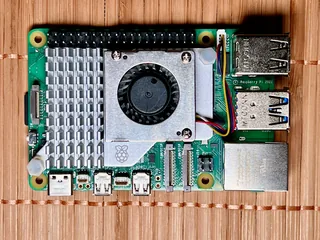
Raspberry Pi + Signal K + SensESP
What we like
- Absolute control — every piece is inspectable, modifiable, replaceable
- No vendor lock-in, ever. The software is open source; swap any hardware piece without losing data
- Signal K is a proper data standard — your boat's data is yours, in a format other tools understand
- SensESP lets you build custom sensors for things commercial systems don't monitor (freshwater tank, fridge temp, individual battery cells, holding tank)
- Infinite expansion — add Grafana dashboards, Home Assistant integration, ML anomaly detection, whatever
- Genuinely cheaper than commercial systems at every horizon past year one
What could be better
- You are now the IT department. When an SD card corrupts at 3 a.m. on New Year's Eve, nobody is going to fix it except you
- Initial setup is a real time commitment — two weekends is the floor, not the ceiling
- No phone support, no warranty, no Santa-Claus-level customer service
- Signal K's ecosystem is good but not polished — UX isn't the focus
- Cellular connectivity requires separate configuration (a modem plus a self-hosted remote-access solution like Tailscale)
If you're comfortable with Linux, the open-source DIY stack is genuinely the best monitoring platform you can build for the money — and it's arguably the best monitoring platform at any price for the decade-long horizon. A Raspberry Pi running OpenPlotter becomes the brain of your boat: it hosts a Signal K server, talks to NMEA 2000 via a cheap gateway, aggregates sensor data from cheap ESP32-based SensESP sensors, and exposes everything through a web dashboard you can access over your boat's Wi-Fi.
For remote monitoring, you add one of two things: a cellular modem with an IoT SIM (Hologram and Soracom both offer sub-$24/year plans for low-data IoT use), or a Starlink Mini if you're OK with the hardware and power cost (unlimited high-speed data needs the $175/mo Roam Unlimited plan; Roam 100GB is $55/mo). Remote access happens via a self-hosted VPN (Tailscale is free for personal use and genuinely painless), which means your boat's data goes to no cloud vendor — it goes directly to your phone.
The power of this architecture is that nothing depends on a single vendor. If OpenPlotter stops being maintained tomorrow, you can keep running it on current hardware indefinitely, or migrate the data to Signal K running on something else. The sensors are standard ESP32 boards you can buy from a dozen vendors. The cellular modem is a generic LTE stick. There's no company whose failure ends your monitoring capability.
Real cost breakdown
Open-source stack, full cost
| Component | Cost | Purpose |
|---|---|---|
| Raspberry Pi 5 + case + SD card | ~$120 | The brain |
| Digital Yacht iKonvert NMEA gateway | ~$240 | NMEA 2000 ↔ USB |
| 3× ESP32 dev boards (for SensESP sensors) | ~$45 | Custom sensors |
| OpenPlotter + Signal K + OpenCPN | Free | Full OS stack |
| SIM Hat or USB LTE modem | ~$60 | Remote connectivity |
| Hologram IoT SIM (3 years) | ~$72 | Cellular data |
| Complete build, 3-year total | ~$537 |
Compare that to Siren 3 Pro at $1,475 or a ZigBoat Starter Kit at $999 (before adding 4G) over the same three years, and the DIY stack is about a third of the Siren's cost and more capable. The asterisk is your time, which is real. If two full weekends of setup plus ongoing system administration is worth more than $900 to you, go commercial. If it's not — and for a lot of technically-inclined boat owners, the tinkering is the fun part — this is the right answer.
Since Starlink Mini launched, DIY cellular modems have become optional for a lot of cruisers. If you already run Starlink on the boat, your DIY stack piggybacks on that existing internet connection at zero marginal cost — no IoT SIM needed. The Pi's monitoring web interface becomes accessible over Tailscale whenever the boat has Starlink up, which on most well-powered boats is 24/7. This quietly makes the open-source stack cheaper than commercial monitors for Starlink boats specifically.
Local alarm only: Johnson Bilge Alert
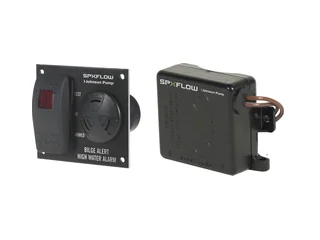
Johnson Pump Bilge Alert with Ultima Switch (72303-001)
What we like
- Cheap — you can protect a 25-foot sailboat for under $50
- Rock-solid reliability — no software, no firmware, no app to update
- Sealed Mirus field-effect sensor never touches the water and has no moving parts to corrode or jam
- Test button and mute switch right on the panel
- Will outlive you
What could be better
- Does nothing if you're not within earshot — no phone alerts, no SMS, no push
- Can wake you up at 2 a.m. at the marina — which is the point, but your neighbors will notice
- No logging, no trend data, no app dashboard — it's a buzzer
- Only handles bilge — add more for battery, hatch, etc., and the cost adds up
We include the Johnson Bilge Alert and its equivalents (Safe-T-Alert, Aqualarm) because the honest truth is that for a meaningful slice of boat owners, this is the right answer and the entire cellular-monitor industry is overselling. If you live on your boat, if you keep the boat next to your house, if you visit the boat daily during active season — a $45 audible alarm does the job the $1,500 cellular monitor does, minus the cellular.
The Johnson Bilge Alert with Ultima Switch (72303-001) senses water through a sealed Mirus field-effect sensor — no moving parts, no metal contacts in the water, no float to jam. When water stays at the sensor for 3 seconds, a 100 dB alarm sounds and a red light comes on at the panel; the short delay filters out brief splashes. You hear it; you fix the problem; you switch the panel to off. Done.
Pair an audible bilge alarm with a simple battery-voltage monitor (Victron BMV-712 at around $200 is the standard) and you have serious boat protection for under $250. The trade-off is that the alarm only works when you're within earshot. For a boat that lives where you don't, it's not enough — but for a boat you see every day, it's all you actually need. For a deeper look at bilge-monitoring options specifically, see our best bilge monitor for sailboats guide.
The prepaid-SIM hack (and why we don't recommend it)
Worth addressing because you'll see it discussed on forums. Some boat owners — particularly international cruisers — pair a cheap GSM boat alarm (often from European vendors you've never heard of: Vanemar, Boat Alarm, Yacht Control) with a pay-as-you-go SIM card. The math looks great: $150 for hardware, $20 in prepaid credit, done. Total first-year cost under $200.
The problems are real, though:
- Prepaid SIMs expire. Most European prepaid SIMs deactivate after 3–6 months of no activity. Your winter-stored boat isn't making calls; the SIM dies; your alarm is now offline. You don't find out until you try to test it.
- SMS-only alerts are slow and unreliable. A push notification arrives in 2–5 seconds. An SMS can take 30 seconds to several minutes, especially across international carriers. For fire or flooding, that latency matters.
- Regulatory compliance is inconsistent. Some jurisdictions require registered SIM ownership, which complicates prepaid use. When customs and carriers tighten rules, prepaid setups can stop working without warning.
- 3G sunset already happened in most markets. Many cheap GSM alarms still on the market in 2026 are 3G-only and will not work anywhere with a sunset carrier.
The prepaid-SIM hack works if you're technical enough to monitor the SIM status and you're comfortable managing the ongoing plumbing. For most people, either a true subscription-free system (ZigBoat, DIY) or a commercial subscription (Siren, ArmIt, Yacht Sentinel) is less work and more reliable.
The Frankenstein build
One more approach worth mentioning — the hybrid. A lot of experienced boat owners end up with a specific combination:
- A cheap audible bilge alarm (~$45) mounted on the boat, always active, doesn't care about internet or cellular or anything. If you're on the boat, you hear it.
- One or two ArmIt battery-powered sensors (a $229.99 BilgeMAX One kit on the $100/year plan, or add a battery sensor and step up to the $150/year plan) for the specific scenarios where remote alerting matters, if ArmIt's private network covers your marina. Bilge high-water and battery-low are the usual choices.
- Optionally, a DIY dashboard on a Pi if the owner is technical, pulling data from the boat's NMEA 2000 network for things like engine hours and tank levels that don't need cellular alerting.
Total cost for this build: around $600 first-year hardware, $100–$150/year in ongoing fees. It's cheaper than Siren, cheaper than a 4G-connected ZigBoat, and covers the bases that actually matter. The trade-off is that it's three separate systems instead of one dashboard — you're checking the audible alarm manually when you board, checking the ArmIt app for remote alerts, and checking the Pi (if you built one) for detailed data. For a lot of owners, that's fine.
What we'd skip
Any no-name GSM boat alarm on Amazon for under $100
If the listing doesn't name a recognizable vendor (Vanemar, Glomex, a major marine brand) and the price is implausibly low, there's a reason. These products typically ship with 3G-only modules, buggy firmware, SIM slot quirks, and no meaningful support. Forum reports of false alarms, dead alarms, and alarms that fire on unrelated phone calls are consistent across this category. Save the $80 for something that works.
Apps that claim "no subscription" but charge for SMS alerts
A handful of products are priced cheaply and marketed as subscription-free, but lock remote SMS alerts behind a per-message or monthly fee once you activate the feature. This is not subscription-free; it's subscription-with-a-different-name. Read the full terms before you buy.
Legacy Boat Fix hardware
Boat Fix has had multiple product generations and company changes. Some older generations are no longer supported. If a dealer is selling Boat Fix hardware at a discount, confirm the specific SKU is still actively supported by the company before you buy.
When no-subscription is actually the right answer
To summarize, here's who should realistically go subscription-free and who shouldn't:
Go subscription-free if:
- You're technical enough to run the DIY stack — the open-source route is genuinely the best option in this segment
- Your boat is at a location where local Wi-Fi monitoring is enough (liveaboard, backyard boat, daily visits)
- You're specifically ideologically opposed to vendor cloud dependencies and you're willing to pay more in time or upfront cost to avoid them
- You already run Starlink on the boat for other reasons — this makes DIY remote monitoring essentially free
Pay the subscription if:
- You want to install something and not think about it — subscription systems are easier to maintain
- You need real-time push notifications, app polish, and support when things break
- Your boat is somewhere you don't visit daily, but it's within cellular range
- You're not comfortable with Linux or soldering and you don't want to become comfortable
- The $225/year feels like reasonable insurance compared to the cost of a sunk or stolen boat
When we'd update this pick
We'd revisit this guide when:
- A mainstream commercial vendor ships a system with a proper data-export feature (Signal K or similar), which would blur the line between commercial and DIY
- Glomex publishes US pricing for the 4G Connectivity Kit, or ships a better app
- A new entrant ships subscription-free cellular monitoring at a competitive price — this is an obvious gap in the market
- Starlink Mini pricing drops further, making the DIY-over-Starlink approach viable for more owners
- Open-source monitoring tools (Signal K ecosystem particularly) reach the UX polish level of commercial apps
Frequently asked questions
Can you monitor a boat without a subscription?
Yes. The Glomex ZigBoat is the only mainstream commercial monitor that runs with zero ongoing fees — local Wi-Fi notifications when aboard, SMS via a BYO SIM when remote. An open-source Raspberry Pi + Signal K + SensESP stack is even more capable for around $400 in hardware if you're comfortable with Linux. For on-boat-only owners, a $45 Johnson Bilge Alert audible alarm does most of what a $1,500 cellular system does.
Should I buy the ZigBoat Starter kit or a 4G kit?
Buy the Starter kit (ZB101, listed at $999 by Glomex USA) if you live aboard, walk past the boat daily, or the boat is in your backyard — the gateway's local Wi-Fi is enough. If the boat lives at a marina you visit weekly or less often, or you leave it for seasons, you need a cellular connection for remote alerts: ZigBoat's 4G Connectivity Kit (ZB104G) or the ZigBoat 4G Link (ZB212) added to a gateway, with your own SIM. Avoid the older Pro Connected Kit (ZB106), which Glomex USA still lists with a 3G module.
Does the prepaid SIM hack work for boat monitoring?
Mostly no. Prepaid SIMs deactivate after 3-6 months of no activity, SMS alerts are slower and less reliable than push notifications, regulatory compliance varies by jurisdiction, and many cheap GSM alarms are still 3G-only in 2026. It works only if you're technical enough to monitor the SIM status and manage the plumbing. For most owners, ZigBoat or a true commercial subscription is less work and more reliable.
Is subscription-free boat monitoring actually worth it?
Subscription-free wins if you're technical enough to run a DIY stack, your boat is somewhere local Wi-Fi monitoring is sufficient (liveaboard, backyard boat, daily visits), you object to vendor cloud dependencies, or you already run Starlink on the boat. Pay the subscription if you want install-and-forget simplicity, real-time push notifications, app polish, vendor support, or your boat is somewhere you don't visit daily.
The short version
If you want subscription-free commercial monitoring, buy ZigBoat — it's the only mainstream product that genuinely delivers on the promise. If you're technical, build the open-source DIY stack — it's cheaper, more capable, and more durable than any commercial monitor. If you live on your boat or visit it daily, a $45 Johnson Bilge Alert does 80% of what the $1,500 systems do, for 3% of the cost. And if the subscription isn't actually the thing bothering you — you just want the best monitoring system and $225/year is fine — go back and read our main cellular monitoring guide.