Why Home Assistant makes sense on a boat
Commercial boat-monitoring systems solve one problem at a time. A Siren 3 Pro watches your bilge and GPS. An ArmIt sensor alerts you if water appears under the galley. A Nautic Alert covers offshore comms. Each is $400–800, each runs on its own app, each charges a monthly subscription, and none of them talk to each other.
Home Assistant is the opposite pattern. One Raspberry Pi on your boat becomes a hub that reads dozens of different sensors — water, temperature, humidity, shore power, refrigerator state, cabin door — and exposes everything through one dashboard and one automation engine. No subscriptions. No cloud. No vendor lock-in. If you want a new sensor, plug it in. If you want a new automation, write three lines of YAML.
The setup isn't for everyone. If you want a device that you charge once, stick under the engine hatch, and never think about again, buy a Siren 3 — our cellular monitoring guide exists for exactly that person. Home Assistant is for the boater who's willing to invest a weekend in a system they control and can extend forever. In exchange you get capabilities no commercial platform matches.
The parts list
All prices verified against Amazon at time of writing. Every Amazon link routes through our affiliate redirect — we earn a small commission if you purchase, at no extra cost to you.
Core build — the minimum to get started
| Item | Why it matters | Price |
|---|---|---|
| The Home Assistant computer | ||
|
Raspberry Pi 5 (4GB) Check on Amazon → |
Runs Home Assistant. 4GB handles everything in this guide with headroom. | $60 |
|
Official Pi 5 27W power supply Check on Amazon → |
Pi 5 needs more amps than generic USB-C bricks provide. Use the official one. | $12 |
|
Active cooler for Pi 5 Check on Amazon → |
HA runs hot. Prevents throttling. Essential, not optional. | $5 |
|
Samsung EVO Plus 64GB microSD Check on Amazon → |
Boot + storage. Samsung cards survive more write cycles than no-name brands. | $10 |
|
Aluminum case for Pi 5 Check on Amazon → |
Mechanical protection, additional heat dissipation, clean install. | $15 |
| Pi subtotal | $102 | |
| Zigbee coordinator — the hub for all your sensors | ||
|
Sonoff Zigbee 3.0 USB Dongle Plus-E Check on Amazon → |
Plugs into the Pi, becomes your Zigbee network coordinator. Supports hundreds of sensors. | $30 |
| Zigbee subtotal | $30 | |
| Starter sensor pack | ||
|
Aqara Water Leak Sensor (3-pack) Check on Amazon → |
Three cells for: bilge, under galley sink, under head. Zigbee, 2-year battery. | $55 |
|
Aqara Temperature/Humidity Sensor (3-pack) Check on Amazon → |
Cabin ambient, engine bay, refrigerator interior. Industrial-grade accuracy. | $40 |
|
Aqara Door/Window Sensor (3-pack) Check on Amazon → |
Companionway, engine hatch, locker doors. Gives you an instant "is the boat locked up" dashboard. | $38 |
| Sensor subtotal | $133 | |
| Shore power monitor | ||
|
Shelly Plug US Gen4 Check on Amazon → |
Wi-Fi/Zigbee smart plug with power metering. Watches shore power current, alerts on disconnect. | $25 |
| Shore power subtotal | $25 | |
| Build total | $290 | |
That gets you a running HA install with 9 wireless sensors and a shore-power monitor. Everything below is optional — stuff you can add if you want more depth.
Optional upgrades
|
M.2 NVMe SSD hat for Pi 5 Check on Amazon → |
Replaces SD card with a proper SSD. Much more reliable over long-term use, especially on boats (vibration + power cycles kill SD cards). | +$70 |
|
SONOFF SNZB-02D LCD Temperature sensor Check on Amazon → |
Has its own LCD display — useful if you want to see temp at a glance without opening the HA app. Zigbee, pairs with the same coordinator. | +$20 |
|
Zigbee smoke detector Check on Amazon → |
Smoke or CO alarm that also pushes alerts to HA. Belt-and-suspenders on top of your boat's existing alarms. | +$45 |
|
Aqara Hub M3 (Matter/Thread/Zigbee) Check on Amazon → |
Alternative to the Sonoff dongle. If you prefer a dedicated hub with more features (IR blaster, Matter bridge, Thread support) and don't mind the extra box. Most people should stick with the Sonoff dongle. | alt. $80 |
The featured parts, in detail
Most parts in the list above are commodity items (an SD card is an SD card). But five components shape the build, and each deserves a closer look — especially since picking the wrong one can either cripple the setup or lock you into a proprietary ecosystem you'll regret.
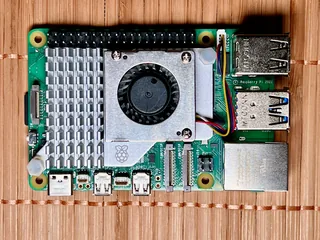
Raspberry Pi 5 (4GB)
Why this model
- HA OS runs very comfortably on 4GB with dozens of integrations active
- USB 3.0 ports drive the Zigbee dongle with full bandwidth (matters for dense sensor networks)
- First-party Home Assistant OS image supports the Pi 5 directly — one-click install via Raspberry Pi Imager
- PCIe lane enables NVMe SSD upgrade path — crucial for a boat build where SD card reliability is suspect
- Genuinely capable as an all-in-one Pi: HA + Signal K + Node-RED + Grafana all run on one 4GB unit without breaking a sweat
Trade-offs
- If you plan to run HA + OpenPlotter + video recording + heavy database workloads, consider the 8GB model (+$20)
- Must use the official 27W PSU — cheaper USB-C bricks cause random reboots
- Passive case alone isn't enough; the active cooler is mandatory for long-term boat operation
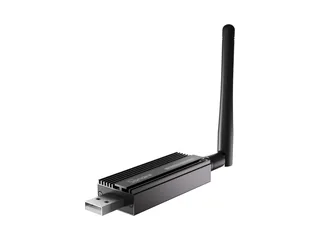
Sonoff Zigbee 3.0 USB Dongle Plus-E
Why this coordinator
- Home Assistant's ZHA integration supports it natively — no extra software like Zigbee2MQTT required
- Silicon Labs EFR32MG21 chipset is the reference design for Zigbee 3.0 — widest device compatibility
- External antenna version (Plus-E, the E variant) has noticeably better range on boats where cabin structure attenuates signal
- Supports OTA firmware updates to keep current with Matter / Thread developments
- No cloud dependency — entirely local, nothing phones home
Trade-offs
- Requires a short USB extension cable to keep it away from Pi EMI (use the one that came with your Pi case, or a 1m extension)
- If you're a hardcore HA user, Zigbee2MQTT supports more obscure devices than ZHA — but for boat sensors ZHA is plenty
- Cannot act as a Thread border router — if Matter-over-Thread matters to you, consider the Aqara Hub M3 instead

Aqara Water Leak Sensor (3-pack)
Why this sensor
- The most reliable Zigbee leak sensor on the market — the Home Assistant community uses these as reference
- 2-year battery life on a coin cell, critical for a sensor you install once and forget
- IPX7 rated — survives direct water contact, which is the whole point
- Small enough to fit under the galley sink or in a bilge corner without obstruction
- Pairs directly with the Sonoff coordinator via ZHA — no Aqara hub needed
- Also reports internal temperature (useful as a tell if the sensor's fallen into warm water from a leaky hot-water line)
Trade-offs
- Aqara marketing pushes their hub hard, but you don't need it for HA use — ZHA handles it
- The sensor floats, which is great for detection but means you want to secure it in place (a dab of velcro solves this)
- CR2032 battery replacement requires opening the case; keep a few spares
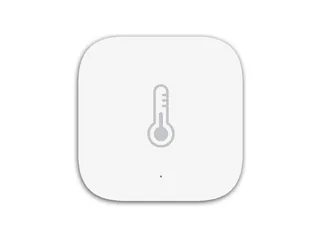
Aqara Temperature & Humidity Sensor (3-pack)
Why this sensor
- Industrial-grade Sensirion sensor module — the same hardware used in lab environmental monitors
- Three readings per sensor (temp, humidity, pressure) means one sensor does the work of three
- Barometric pressure is the sleeper feature — useful for tracking weather changes from the boat without a separate weather station
- Tiny footprint (36mm), fits in a fridge, a locker, an engine compartment easily
- Zigbee mesh — each sensor relays for its neighbors, extending network range
Trade-offs
- Not waterproof — these are for dry spaces (cabin, engine bay, fridge), not bilge or cockpit
- Some users report sensors "freezing" values after months of operation; re-pairing usually fixes
- Reporting interval is throttled to save battery; don't expect sub-minute updates
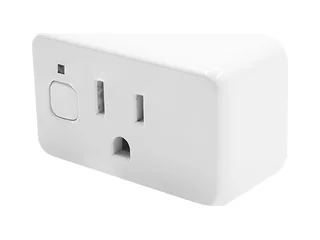
Shelly Plug US Gen4
Why this plug
- The cheapest way to get reliable shore-power detection — way simpler than wiring a dedicated voltage monitor
- Meters watts, volts and amps, so you see exactly how much the fridge, heater, and chargers are drawing
- Official Home Assistant integration is first-class — discovered automatically, rich entity set
- The Zigbee radio can join the same Sonoff coordinator as your Aqara sensors, so shore-power alerts don't depend on the boat's Wi-Fi staying up
- Works entirely locally — no Shelly cloud account required for HA to read it
- Built-in overheating, overcurrent and overpower protection, plus an internal temperature sensor
Trade-offs
- Ships in Wi-Fi mode — switching to Zigbee is a settings toggle (or five quick presses of the button), and Bluetooth turns off in Zigbee mode
- US plug format only — European boats need an EU-format Shelly plug
- Not waterproof; for damp cockpit locker installs you want a marine-grade outlet enclosure
- Power monitoring is only on the circuit downstream — doesn't see battery state or inverter output
- Replaces the Shelly Plus Plug US, which Shelly no longer sells in the US — if you already own one, it works the same way over Wi-Fi
How the pieces fit together
    RASPBERRY PI 5 (below deck, tucked away)
    ┌──────────────────────────────────┐
    │                                  │
    │   ┌──────────────────────────┐   │
    │   │  Home Assistant OS       │   │
    │   │  ├─ ZHA integration      │   │
    │   │  ├─ Shelly integration   │   │
    │   │  ├─ Signal K integration │   │
    │   │  └─ Automations (YAML)   │   │
    │   └──────────────────────────┘   │
    │                                  │
    └──────┬──────┬───────┬────────────┘
           │      │       │
           │      │       │ Wi-Fi (boat network)
           │      │       │
       USB │      │       └──── Shelly shore power plug
           │      │
           │      └──── Signal K server
           │              (on same Pi, or on separate chartplotter Pi)
           │
           ▼
    ┌──────────────────┐
    │ Sonoff Zigbee    │  - builds its own mesh -
    │ 3.0 USB Dongle   │
    └────┬─────────────┘
         │ Zigbee 2.4GHz
         │
     ┌───┴─────────────────────────────────┐
     ▼                 ▼                   ▼
  Water leak    Temp / humidity    Door / window
  (bilge x3)     (cabin, engine,      (companionway,
                  fridge, x3)          hatches, x3)
The important insight: the Raspberry Pi is the brain of everything. It runs Home Assistant, which owns the sensors, the automations, and the dashboard. The sensors talk to it via Zigbee (a mesh network, each sensor relays for its neighbors). The shore power plug talks to it via Wi-Fi. If you've built the open-source chartplotter from our other guide, that Pi already runs Signal K — and Home Assistant pulls data in from Signal K so your boat's real-time NMEA data (speed, position, wind, depth, engine) becomes available alongside the household-style sensors.
Why Zigbee sensors, not Wi-Fi
You'll see lots of Wi-Fi smart sensors on Amazon — Govee, YoLink, TP-Link. They're cheap and they "just work." For a house, they're fine. For a boat, there's a strong case against them:
- Battery life. Wi-Fi sensors burn through batteries in weeks. Zigbee sensors last 2–3 years on a coin cell. On a boat where you can't always change batteries easily, this matters.
- Network pollution. Each Wi-Fi sensor takes a slot on your boat's Wi-Fi. If you have 10 sensors plus your phone, tablet, laptop, and Starlink, you'll hit router limits on cheap marine routers (see our marine internet stack guide).
- Dependence on Wi-Fi uptime. If your marina Wi-Fi or boat AP reboots, Wi-Fi sensors drop off until they reconnect. Zigbee is independent — the Pi IS the network controller.
- Cloud round-trips. Many Wi-Fi sensors phone home to a vendor cloud before HA can see them. Useless when the boat is in a cellular dead zone.
- Mesh robustness. Zigbee sensors automatically relay for each other. A sensor at the bow can reach the Pi at the nav station by hopping through sensors in the saloon. Wi-Fi has no equivalent.
The tradeoff: you need a Zigbee coordinator (the $30 Sonoff dongle). Once you have it, every new Zigbee sensor is cheaper, better, and more reliable than its Wi-Fi equivalent. This decision compounds quickly as you add sensors.
Installing Home Assistant on a Raspberry Pi
Home Assistant offers a full OS image for Raspberry Pi that handles everything — no need to install Linux first and then HA on top. This is by far the easiest path.
Download and flash the HA OS image
Install Raspberry Pi Imager on your regular computer from raspberrypi.com/software.
Open it, click Choose Device → Raspberry Pi 5. Click Choose OS → scroll down to "Other specific-purpose OS" → "Home Assistants and Home Automation" → "Home Assistant" → "Home Assistant OS (RPi 5 / 64-bit)". Click Choose Storage and select your microSD card.
Click Next. Answer "No" to custom OS settings. Confirm. The imager downloads the latest HA OS and writes it to your SD card in about 10 minutes.
First boot
Insert the SD card into the Pi. Plug the Sonoff Zigbee dongle into any USB port (do this before first boot so HA detects it). Connect Ethernet if available — first-time install is much faster over wired network. Plug in power.
First boot takes 15–20 minutes on a Pi 5 — don't panic if nothing seems to happen. HA is downloading its supervisor, core, and initial integrations. Leave it alone.
When it's done, find the Pi's IP address (check your router, or try http://homeassistant.local:8123 in a browser). The HA setup wizard prompts you for a username, password, boat name ("location"), time zone, unit system. Set them and continue.
Configure HA for offline / boat use
In HA's settings, go to System → General and set your time zone correctly. Then Settings → Network — configure Wi-Fi if you're going to run the Pi wireless (Ethernet is more reliable if you can).
Under Settings → Devices & Services, decline the default Google/Nabu Casa prompts unless you specifically want those features. You can add them later.
Setting up Zigbee with ZHA
ZHA (Zigbee Home Automation) is Home Assistant's built-in Zigbee integration. It's the simplest way to use Zigbee, requires no separate software, and works natively with the Sonoff coordinator.
Add the ZHA integration
Go to Settings → Devices & Services → Add Integration → search for "Zigbee Home Automation". HA should automatically detect your Sonoff dongle (it'll appear as /dev/ttyUSB0 or similar). Select it.
Choose radio type: "EZSP" or "Silicon Labs" (depends on your dongle generation — the setup wizard usually picks the right one). Use default port settings. Wait 30 seconds — HA creates a new Zigbee network.
Pair your first sensor
Take an Aqara water leak sensor. Remove the plastic battery pull-tab. Press and hold the tiny reset button on the side for about 5 seconds — the LED will blink rapidly.
In HA, go to Settings → Devices & Services → ZHA → Add Device. HA enters pairing mode for 60 seconds. The sensor should appear within 10–15 seconds.
Rename it to something useful — not "Aqara Sensor 1" but "Bilge Water Detector". Assign it to an area (e.g., "Engine Bay"). Repeat for each sensor, renaming as you go.
Zigbee range through a boat's structure (fiberglass and wood are fine, aluminum or steel hulls attenuate significantly) is typically 10-15 meters direct. The mesh extends this — every mains-powered Zigbee device also acts as a repeater. If you have a Zigbee smart plug plugged in somewhere, it extends the network. Battery-powered sensors do NOT repeat, so if you can't reach the bow, add a Zigbee plug in the saloon as a relay.
Adding your first sensors
Where to actually put them. Based on what failure modes a boat actually has:
- Water leak sensor #1 — bilge. Taped to the side of the bilge, above the normal water line but below where water would pool if the pump failed. This is the most important single sensor you'll install.
- Water leak sensor #2 — under galley sink. Behind the plumbing. Catches slow leaks from the P-trap or water filter lines, which otherwise ruin a cabinet before you notice.
- Water leak sensor #3 — under head floor. Holding tank seeps, macerator hose failures, toilet seal leaks. Worst smell on a boat starts here.
- Temp/humidity #1 — cabin saloon. Watches interior conditions when you're off the boat. Spike in temp + humidity is often a sign of a leak or AC failure.
- Temp/humidity #2 — engine bay. Normal is ambient. Unusual high temperatures suggest a running engine (you're away, no one should be running it) or an overheating battery.
- Temp/humidity #3 — refrigerator interior. Fridge failure is common on boats. If the fridge climbs above 45°F when you're not aboard, your food's gone. This sensor catches it immediately.
- Door/window #1 — companionway. Primary security alert. If someone opens it when you're not aboard, you get notified.
- Door/window #2 — engine hatch. Mechanical access. Unusual opens mean someone's tampering, or a fisherman's boarding to "borrow a part."
- Door/window #3 — cockpit locker (or head door). Depends on boat. Anything you want to know has been opened.
The shore-power monitor
The Shelly Plug US Gen4 is the single most useful $25 you'll spend on this build. Here's why:
Your boat is plugged into the dock. You're at home 50 miles away. The marina has a power outage, or your breaker trips. Your batteries start discharging. Your refrigerator compressor runs until they die. Your bilge pump won't start when needed. You have no idea any of this is happening until you come down for the weekend and everything's dead.
The Shelly is an in-wall-style plug that goes between your shore-power inlet extension and whatever you have plugged in next. It measures real-time current draw. Home Assistant reads this. If the current drops to zero — shore power lost — HA sends you a push notification. If it stays at zero for more than 5 minutes, you know it's not just a brief blip.
Install the Shelly
Plug it into any 120V outlet that's downstream of your shore-power inlet. Plug whatever was in that outlet back into the Shelly. It's inline.
Download the Shelly app on your phone. Connect to the Shelly's Wi-Fi network (it broadcasts its own SSID on first boot). Configure it to join your boat's Wi-Fi. Note the IP address it gets.
Add the Shelly to HA
In HA: Settings → Devices & Services → Add Integration → "Shelly". Enter the Shelly's IP address. HA auto-detects the device and imports its entities — power draw in watts, total energy consumed, on/off state. Rename it "Shore Power Monitor" and you're done.
Pulling boat data in from Signal K
If you've already built the open-source chartplotter with Signal K, you have a goldmine of boat data — GPS, speed, wind, depth, battery voltage, engine data, AIS targets — already streaming into a Signal K server. Home Assistant can read all of it.
Add the Signal K HA integration via HACS (Home Assistant Community Store). This gives you automations like:
- Geofencing — "when the boat's GPS moves more than 100m from its mooring, alert me"
- Battery trend logging — three months of voltage history, visible as a Grafana graph
- Engine run hours — tracked as a persistent counter
- Wind alerts at anchor — "when apparent wind exceeds 25 knots while anchored, alert me"
- AIS proximity — "when any AIS target gets within 0.25nm, play an alarm"
This is where Home Assistant genuinely outshines every commercial boat monitor. A Siren 3 will tell you the current battery voltage. Home Assistant will graph it over 6 months and show you a slow decline that means your bank is aging.
Automations that actually matter
The automation engine is the whole point of Home Assistant. Here are six automations that have real-world value on a boat — every one of these has been built and tested by actual boat owners:
Bilge alarm escalation
The bilge sensor triggers. Immediate push notification: "Water detected in bilge at 14:23." Wait 2 minutes. If still triggered, send SMS. Wait 5 more minutes. If still triggered and you're more than 1km from the boat, email emergency contact plus dock neighbor.
Shore power disconnect alert
Shelly power drops to 0W. Wait 3 minutes (ignore brief marina grid blips). If still 0W, push notification. Wait 10 more minutes. If still 0W during business hours, send SMS. Start logging battery voltage at 30-second intervals for later review.
Fridge failure detection
Refrigerator interior sensor climbs above 45°F for more than 20 minutes. Push notification: "Fridge internal temp rising — compressor may have failed." Also logs an event so you can correlate with shore power or battery voltage.
Unexpected companionway open
Companionway door opens while HA's presence detection says you're not within 1km of the boat. Immediately push notification + SMS. Take a Wi-Fi snapshot of any recent camera activity (if you have one) and attach to the alert.
Anchor alarm (if you have Signal K)
Using Signal K's GPS feed, "anchor mode" monitors if the boat drifts more than a defined radius (say 30m) from its anchor set-point. Triggers: local alarm (Pi speaker or HA Voice puck), push notification, MOB broadcast to nearby AIS-equipped boats.
Battery bank stress alert
Battery voltage drops below 12.0V for more than 15 minutes (suggests deep discharge, not just engine start). Push notification. Log current consumption. If it drops below 11.5V, send SMS — this is battery-damage territory.
Building a useful dashboard
HA dashboards are flexible. Start simple: one dashboard, 4 cards arranged vertically on your phone.
Card 1 — status at a glance: big green/red indicator showing "ALL CLEAR" or listing any triggered sensors. One quick look tells you if you need to worry.
Card 2 — environmental: cabin temp/humidity, engine bay temp, fridge temp, current ambient conditions. Numbers with trend arrows.
Card 3 — power: shore power state (on/off), current draw in watts, battery voltage (from Signal K), percentage of bank capacity. The core "how's my boat powered" view.
Card 4 — access: three door sensors showing open/closed state. If anything's unexpectedly open, it's red.
Once you have this base, add things as you need them. Graphs for long-term trends. Maps with GPS (if Signal K is wired up). Weather forecasts. The temptation is to build a complex Wirecutter-style dashboard with 40 tiles. Resist it. The best HA dashboards tell you what's wrong in under 2 seconds.
Remote alerts when you're off the boat
HA can send push notifications two ways:
Via the Home Assistant Companion app (iOS and Android, free). Install it on your phone, point it at your HA instance's URL, log in. Any automation that uses notify.mobile_app_yourname hits your phone as a push notification. Works when the boat has internet access. Requires you to expose HA to the internet via Nabu Casa Cloud ($6.50/month) or a self-hosted VPN (free, but more setup).
Via SMS through Twilio ($20 to set up a phone number, then ~$0.01/message). More reliable — SMS gets through when data doesn't, and doesn't require a specific app. The Twilio HA integration is one-click; you just need an account.
For cruising boats where you might be in cellular dead zones, you need either a Starlink or a marine cellular router to give the Pi any internet at all. If you have no onboard internet, HA still logs everything locally — you just won't get alerts until you're back in range.
This build is an information and alerting system, not a safety system. It doesn't replace a proper bilge pump with a float switch. It doesn't replace a Coast Guard-approved fire detector. It doesn't replace an AIS MOB system. Use it to know things are happening — use proper marine equipment to prevent things from happening.
The honest limitations
Things this build genuinely doesn't do well, compared to commercial alternatives:
It depends on the Pi running
A Pi on a boat is more failure-prone than you'd think. SD card corruption, condensation on connectors, brownouts during engine start. If the Pi crashes, your entire monitoring stack goes dark. A commercial system like Siren 3 has engineered redundancy you don't get from a DIY build.
Battery backup needs planning
If shore power fails AND your boat batteries die, the Pi stops alerting you about the shore power failure. The optional UPS hat partially solves this (the Pi gets its own backup), but the sensors that were relaying mesh traffic lose power too. For sizing a small house bank that keeps the Pi alive between charge cycles, see our solar power for smart boats guide.
Marine environment is harsh on consumer electronics
Zigbee sensors designed for a living room don't love salt air. Aqara sensors in a dry cabin usually last years. In an engine room with fuel fumes and heat cycling, 12 months might be optimistic. Plan for replacement as part of the maintenance cycle.
First-time setup is genuinely 4–6 hours
The parts list is straightforward, but wrangling everything through first-pair can be painful. Allow a full afternoon for the base install, another weekend for automations and dashboard refinement. This isn't "plug it in and walk away."
The short version
A $290 Home Assistant build — Raspberry Pi 5, Sonoff Zigbee dongle, Aqara sensors, Shelly shore-power plug — gives you a genuinely professional-grade boat monitoring system that no commercial single-product solution matches. The capability is deeper, the cost is lower, and you own the whole stack. It's not the right pick for absentee owners who want plug-and-forget — a Siren 3 Pro is better for that. But for a boater who's already thinking about connected tech, already comfortable with a Raspberry Pi or similar, and wants a platform that grows as their thinking evolves: this is the best money you'll spend on your boat.