What Signal K actually is — the data model
Signal K is two things: a data model (an agreed shape for marine data) and a protocol (how that data moves between systems). Both are open standards, both are free, and together they solve a problem that has haunted boat electronics for thirty years: every sensor on every backbone speaks its own dialect, and stitching them together used to require writing parsers for each one.
The data model is a single JSON tree rooted at vessels.self. Everything on your boat — GPS position, engine RPM, depth, wind, battery voltage, bilge state, AIS targets, the temperature in the fridge — lives at a predictable path. Engine RPM is at vessels.self.propulsion.main.revolutions. Depth below transducer is at vessels.self.environment.depth.belowTransducer. AIS targets are under vessels.aisMmsi.navigation.position. The paths are standardized across every boat running Signal K, which means a dashboard written for one boat just works on another.
The protocol layer exposes that tree over HTTP (request a snapshot of any path) and WebSocket (subscribe to live updates). You connect once, subscribe to the paths you care about, and the server pushes you JSON every time a value changes. A typical wind-display app subscribes to two paths — environment.wind.angleApparent and environment.wind.speedApparent — and receives updates as fast as the wind transducer pushes them onto NMEA 2000.
What a Signal K message actually looks like
{
  "context": "vessels.urn:mrn:imo:mmsi:368204530",
  "updates": [{
    "source": { "label": "n2k-actisense", "type": "NMEA2000" },
    "timestamp": "2026-06-19T14:23:15.821Z",
    "values": [
      { "path": "navigation.speedOverGround", "value": 4.12 },
      { "path": "navigation.headingTrue", "value": 3.1416 }
    ]
  }]
}
SOG in m/s, heading in radians, ISO 8601 timestamp, MMSI-derived vessel identifier. Standard units (SI) throughout, no NMEA 2000 PGN numbers anywhere, no NMEA 0183 sentence types. That is the entire trick: hide the underlying transport protocols and present a clean, consistent stream.
Why it matters — NMEA 2000 + 0183 + AIS, normalized
NMEA 2000 is a CAN-bus protocol with thousands of binary PGN definitions. NMEA 0183 is ASCII sentences over RS-422. AIS is its own subset of NMEA 0183 with binary payloads. If you wanted to write an app that displays the boat's battery voltage and a few AIS targets, ten years ago you wrote three parsers and stitched the outputs together by hand. Today you point your app at a Signal K server, request electrical.batteries.house.voltage and vessels.*.navigation.position, and the server hands you JSON.
That decoupling is what unlocks the rest of the modern boat stack. The MFD reads NMEA 2000 for the helm display. Signal K reads the same backbone independently and presents the data to:
- Web dashboards on phones, tablets, and laptops anywhere on the boat (or anywhere in the world, with a marine VPN)
- Home automation systems — Home Assistant, Node-RED, openHAB — for alerts and rule-based actions
- Time-series databases — InfluxDB, TimescaleDB — for historical analysis and post-passage review
- MQTT brokers for integration with anything else that speaks MQTT (and almost every IoT thing does)
- Chart plotters — OpenCPN reads from Signal K to draw the boat with full N2K data overlays
All five of those consumers read from the same Signal K server simultaneously, with zero added load on the NMEA 2000 backbone. One subscription model, many consumers, no parser code to maintain.
The "tipping point" moment
Most boat owners who eventually run Signal K hit a tipping point: they want to do one thing — log battery voltage to a graph, get a phone alert when bilge pumps run, see depth on a tablet at the bow — and they realize doing that thing without Signal K means reading PGNs off the bus and writing code, while doing it with Signal K means clicking enable on a plugin. After that first install, every subsequent "one thing" becomes trivial. That is the network effect Signal K is built on, and why the cluster of people running it on cruising boats is growing fast.
Three implementations, in detail
"Signal K" the protocol is one thing; what you actually install on a Raspberry Pi or server is one of several reference implementations. The three below are the ones we'd recommend depending on use case.
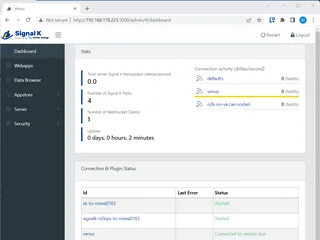
Signal K Server (Node.js) — the reference implementation
This is the project that defines what Signal K does. Maintained by the Signal K non-profit and sponsored by Vesper Marine and Garmin. Runs on Node.js, which means it runs anywhere — Raspberry Pi, a closet server, a Synology NAS, an AWS micro-instance, a Docker container on your laptop. The web UI ships with an integrated plugin store (the "App Store") where you browse and one-click install plugins for NMEA 2000 input, NMEA 0183 input, InfluxDB output, MQTT bridge, Home Assistant integration, and dozens of dashboards. The standalone install is the right pick when you want Signal K and nothing else — you bring your own OS, your own chart plotter (if any), and your own logging stack. The bundled approach (OpenPlotter) is the right pick when you also want OpenCPN and a turn-key Pi image. The signalk-server core is the same in both — OpenPlotter just wraps it.
Strengths
- Reference implementation — protocol behavior is correct by definition
- Plugin App Store inside the admin UI — no manual config files
- Runs everywhere Node.js runs — Pi, NAS, cloud, Docker
- Apache 2.0 — commercial-friendly, no licensing complications
- Actively developed; new releases every few months
Trade-offs
- You bring your own OS — no turn-key image
- You bring your own chart plotter (OpenCPN, separate install)
- Node.js memory footprint is ~150-300MB on Pi (not tiny)
- Some plugins are abandonware; check last-commit date before relying on one
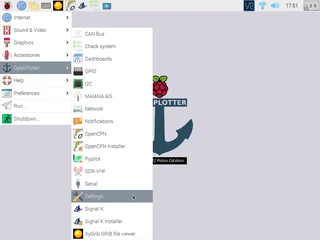
OpenPlotter — the Pi distribution that bundles everything
OpenPlotter is what most cruisers actually run, because it bundles every piece of the open-source marine stack into one Pi image: Signal K Server, OpenCPN (free chartplotter), Kplex (NMEA 0183 multiplexer), an N2K configuration UI, a dashboard called the Boat Computer, and integration with AvNav for tablet displays. You flash a Raspberry Pi 5 with the OpenPlotter image, plug in your NMEA 2000 gateway, follow the wizard, and within thirty minutes you have a working helm computer running OpenCPN with full N2K data overlays, plus Signal K humming in the background feeding everything else. The trade-off: OpenPlotter ties you to the Raspberry Pi platform and to the specific versions of components the maintainers chose. Some people resent that opinionation; most cruisers thank the maintainers for the time saved. Our open-source chartplotter setup guide walks through the full OpenPlotter install end-to-end.
Strengths
- Turn-key — flash the image and you have a helm computer in 30 min
- OpenCPN bundled — free chartplotter with N2K overlay support
- Kplex handles NMEA 0183 multiplexing for older boats
- Active community + frequent releases
- One Pi, one image, one helm computer with everything
Trade-offs
- Locked to Raspberry Pi platform
- Version pinning means you wait for OpenPlotter to release updates
- If you only need Signal K, OpenPlotter is overkill
- GPL license can complicate commercial-derivative use
signalk-cli — Python CLI for headless automation
signalk-cli is the tool you reach for when you already have Signal K running somewhere and want to script against it from a different machine — a NAS that logs data, a Linux laptop that runs custom alerts, a cron job that emails you when the bilge runs more than three times in an hour. pip install signalk-cli and you have a CLI that streams paths to stdout, dumps snapshots to JSON files, watches a path until it crosses a threshold, and pipes cleanly into anything else Unix-y. Not a Signal K server itself — it is a thin Python client that talks to one. The third tool in the Signal K toolchain after the server and OpenPlotter; the one most people don't realize exists until they need it, and then it's the only thing that's the right shape for the job.
Strengths
- Tiny — installs in seconds, runs in MB of RAM
- Cron-friendly — exit codes, pipes, JSON output
- Write alerting scripts in 10 lines of Python
- Works against any Signal K server (your boat, a friend's, demo.signalk.org)
Trade-offs
- Read-only — does not run a Signal K server itself
- You still need a Signal K server running somewhere
- Smaller maintainer pool than the Node server
- Python 3.10+ requirement on older Pi/Linux images can be annoying
Plugin ecosystem — AIS, NMEA 2000, MQTT, InfluxDB
The Signal K Server "App Store" is what makes it actually useful in practice. The core server understands the data model and the protocol; plugins read from real sensors and write to real destinations. Six plugins handle 90% of boat use cases.
Input plugins (read from sensors)
- signalk-n2k-aktion-canboat — reads NMEA 2000 from an Actisense NGT-1 or Yacht Devices YDNU-02 USB gateway. The canonical N2K input plugin.
- signalk-parser-nmea0183 — reads NMEA 0183 from a serial port or TCP socket. For older boats and bridging.
- signalk-aisreceiver — reads AIS direct from a dAISy or quark-elec receiver, parses the AIS payload, and surfaces every target under
vessels.*.
Output plugins (write to destinations)
- signalk-to-influxdb — streams every path to an InfluxDB time-series database. The fundament for "I want to graph battery voltage over the past month."
- signalk-mqtt-gw — bridges Signal K to MQTT. Once on MQTT, anything that reads MQTT (Home Assistant, Node-RED, Telegraf) gets the data.
- signalk-ha — direct integration with Home Assistant for alerts, automations, and dashboards. See our Home Assistant marine setup guide.
Dashboard plugins
- signalk-instrumentpanel — drag-and-drop gauge dashboard you point a tablet at. The "boat dashboard on a tablet" use case.
- signalk-freeboard-sk — full-featured web chartplotter with N2K data overlays, route planning, AIS, and anchor watch.
- signalk-derived-data — calculates true wind from apparent + boat speed, VMG, layline angles, and other derived values. Cheaper than buying a B&G MFD just for SailSteer.
All of these install from the Signal K App Store with one click. No manual config.yml editing for 95% of installs.
Real use cases — chartplotter, Home Assistant, logging
Three concrete patterns we see deployed on cruising boats.
OpenCPN chartplotter with full N2K data overlay
Run OpenPlotter on a Pi. Pi reads NMEA 2000 via an Actisense or Yacht Devices USB gateway. Signal K parses every PGN into JSON. OpenCPN reads from Signal K (via the OpenCPN Signal K plugin) and overlays your boat's heading, speed, depth, wind, AIS targets, and even engine data on top of the chart. You have a chartplotter that does everything a $3,000 MFD does, on a $80 Pi plus a $400 gateway. See our open-source chartplotter guide for the full build.
Home Assistant marine dashboard with phone alerts
Run Signal K + Home Assistant on the same Pi (or two Pis on the boat network). Home Assistant subscribes to electrical.batteries.house.voltage, environment.bilge.state, environment.water.depth, and three or four other paths. You build automations: "if bilge runs more than 2 times in 10 minutes, send me a push notification." "If house voltage drops below 12.0V, send a critical alert." "Every hour, log all NMEA data to InfluxDB." Now your phone is your engine room. Our Home Assistant marine guide covers the wiring.
Long-term data logging for post-passage analysis
Signal K + signalk-to-influxdb + Grafana. Every value on the boat — engine temps, RPM, fuel flow, wind, sail trim if you have the sensors, GPS track — streams to InfluxDB in real time. After a multi-day passage you open Grafana and look at every variable correlated against time. "Why did we lose two knots between 1400 and 1700?" "Wind shifted, sail trim wasn't adjusted, look at apparent wind angle drift." This is the use case that converts pure cruisers into Signal K fans permanently — the post-passage debrief is genuinely a different sport when you have data.
signalk-cli is the tool for "I want to log just a few values, not everything" or "I want to script alerts without standing up Home Assistant." A 12-line Python script using signalk-cli can email you when the bilge runs three times in five minutes, without Home Assistant in the picture at all.
Install: standalone Signal K vs bundled OpenPlotter
The decision tree is short.
Pick OpenPlotter if you want a helm chartplotter too
- Buy a Raspberry Pi 5 (about $80), a 32GB microSD, a marine-rated 12V to USB-C power adapter, and a touch screen if you want a dedicated helm display.
- Flash the OpenPlotter image to the SD with Raspberry Pi Imager or balenaEtcher.
- Boot the Pi. The OpenPlotter Welcome Wizard walks you through Wi-Fi, gateway setup, and basic plugin install.
- Plug in your NMEA 2000 gateway. The wizard auto-detects Actisense and Yacht Devices USB units.
- Open OpenCPN from the Pi desktop. You should see your vessel position, depth, and any AIS targets within thirty seconds.
Pick standalone Signal K Server if you don't need OpenCPN
- On any Linux box (a $5/month VPS works, a NAS works, a closet Pi works):
npm install -g signalk-server
signalk-server-setup
signalk-server- Open
http://localhost:3000(or the box's IP). The Signal K admin UI loads. - Click "App Store" in the sidebar. Install signalk-n2k-aktion-canboat (or signalk-parser-nmea0183 if you're on an older boat).
- Configure the input plugin with your gateway's USB device path (typically
/dev/ttyUSB0) or TCP socket. Save and restart. - Open the "Data Browser" tab. You should see live values streaming in within seconds.
Either path takes about thirty minutes start to finish, assuming you have the NMEA 2000 gateway already. If you don't, that's the longer hardware step — read our gateway guide first to pick one.
Pitfalls — PGN coverage, units, plugin conflicts
Three failure modes you'll hit if you don't see them coming.
Not every NMEA 2000 PGN is mapped
Signal K covers maybe 80% of common PGNs out of the box. Exotic ones — proprietary Volvo engine PGNs, some Garmin SmartBoat sensors, Furuno radar status — may not map automatically. The fix is usually a one-line custom PGN mapping in the canboat config; the plugin docs walk you through it. The painful case is when you don't realize the PGN is missing and silently wonder why your dashboard never updates that value. Always cross-check that the values you care about show up in the Signal K Data Browser before relying on them downstream.
Units are SI everywhere — radians, m/s, kelvin
Signal K standardizes on SI units, full stop. Heading is in radians, not degrees. Speed is in m/s, not knots. Temperature is in kelvin, not Celsius or Fahrenheit. The web dashboards convert to display units automatically; raw API consumers (your custom Python script, your Home Assistant template) do not. If you write a Home Assistant automation that triggers when wind speed exceeds "25" expecting knots, you'll get 25 m/s ≈ 48 knots, which is a much windier alert than you wanted. Always convert at the consumer.
Plugin conflicts — two inputs claiming the same path
If you install signalk-n2k-aktion-canboat and signalk-parser-nmea0183 and both your N2K backbone and your NMEA 0183 instruments report position, you have two sources writing to navigation.position. Signal K's source-priority system handles this, but only if you configure it; out of the box, the last-write-wins behavior produces glitchy position data. Set source priority explicitly in the admin UI: typically NMEA 2000 wins over NMEA 0183 because the N2K backbone is more accurate and higher frequency.
Frequently asked questions
What is Signal K, in plain English?
Signal K is an open-source data model and protocol for marine data. It takes NMEA 2000, NMEA 0183, AIS, weather, and almost any other data stream on a boat, normalizes it into a single JSON tree, and exposes that tree over WebSocket and HTTP. Instead of writing code to parse NMEA 2000 PGN 127488 to get engine RPM, you read /vessels/self/propulsion/main/revolutions and get a number. It is the modern, developer-friendly way to read everything on the boat.
Do I need OpenPlotter to run Signal K?
No. OpenPlotter is one popular Raspberry Pi distribution that bundles Signal K with OpenCPN and a few other tools. Signal K itself runs natively on any Linux box, Windows machine, macOS, or Docker container — it is a Node.js application. If you want a turn-key chart plotter plus Signal K on a Pi, OpenPlotter is great. If you just want Signal K to log data, normalize NMEA traffic, or feed Home Assistant, install signalk-server directly via npm — no OpenPlotter needed.
Is Signal K a replacement for my MFD?
No, Signal K is complementary. Your MFD (Garmin, Raymarine, Simrad) reads NMEA 2000 and displays the same data the helm has always shown. Signal K reads the same NMEA 2000 backbone independently and feeds the data to your phone, tablet, web dashboard, home automation, or remote logging. The two coexist on the same N2K bus without conflict. Think of the MFD as the helm display and Signal K as the data API for everything else on the boat.
How does Signal K talk to NMEA 2000?
You need a gateway that converts NMEA 2000 to a format Signal K can read — typically NMEA 2000 to USB (Actisense NGT-1, Yacht Devices YDNU-02) or NMEA 2000 to Wi-Fi (Yacht Devices YDEN-02, DigitalYacht iKonvert). Plug the gateway into your N2K backbone, connect the USB or Wi-Fi side to your Signal K server, and the server reads PGNs off the bus and translates them into the Signal K JSON model automatically. See our NMEA 2000 gateway guide for the hardware shortlist.
What can I actually do with Signal K?
Real use cases people run today: stream live boat data to a phone or tablet anywhere on the boat over Wi-Fi; log every NMEA value to InfluxDB or PostgreSQL for historical analysis; publish bilge and battery data to Home Assistant for alerts and dashboards; broadcast to MQTT for cross-system integration; bridge NMEA 0183 instruments to NMEA 2000 for older boats; run OpenCPN as your chart plotter with full N2K data; replay logged data for testing or post-passage analysis. The pattern is always: collect once at the gateway, expose to many consumers.
Is Signal K free? Are there licensing concerns?
Yes, fully free. Signal K is open source under the Apache 2.0 license, which means you can use it commercially, modify it, redistribute it, and integrate it into closed-source products without paying anyone. The community is led by a non-profit organization (signalk.org) and the project is sponsored by Vesper Marine, Garmin, and several marine electronics companies. There are no recurring fees, no premium tiers, and no licensing complications for personal or commercial use.
The short version, by use case
You want a turn-key chartplotter + Signal K + everything on a Pi: OpenPlotter on a Raspberry Pi 5. Thirty-minute install, OpenCPN ready out of the box, Signal K humming in the background.
You only want Signal K — no chartplotter: Signal K Server via npm on any Linux box. Ten-minute install. Smaller footprint, more flexibility, your choice of OS.
You want to script against Signal K from another machine: signalk-cli via pip. The right tool for cron-driven alerts, log shipping, and "I want to monitor three paths from my NAS" without standing up a full Pi distro.
The general rule: Signal K is the connective layer for the modern boat. The MFD is the helm display; Signal K is the data API for everything else. Pick the implementation that fits your install constraints, not the protocol — the protocol is the same either way.