Receiver vs transceiver: which do you actually need?
AIS — the Automatic Identification System — is the most useful safety technology to land on small boats in the last twenty years. It's a digital VHF protocol where every transmitting vessel broadcasts its name, MMSI number, position, course, and speed once every few seconds. Your chartplotter receives those broadcasts, overlays them on the chart, and tells you exactly which ship is which, where it's going, and whether it's a CPA (closest point of approach) risk.
The first question — and the one that determines half of your buying decision — is whether you need to broadcast yourself, or just listen.
Receive-only: you see them, they don't see you
A receiver picks up AIS broadcasts from other vessels and feeds them to your chartplotter, phone, or laptop. You can see every commercial ship, ferry, and pleasure craft with an AIS transceiver within VHF range — typically 15 to 30 nautical miles, depending on antenna height. Receivers are cheap (under $200), simple to install (no MMSI required, no registration paperwork), and draw very little power. They're the right tool if you sail in protected water, never cross shipping channels, and your safety concern is "what's that big shape on the horizon."
The trade-off is honest and uncomfortable: you are invisible to other AIS users. A container ship's bridge officer scanning their AIS overlay will not see you. Neither will the Coast Guard, the cruise ship, the fishing vessel, or the sailboat you're crossing tacks with at night. Whether that matters depends entirely on where you boat.
Transceiver: you see them, they see you
A transceiver both receives and broadcasts. You appear on every other AIS-equipped vessel's chartplotter as a labeled icon with your name, course, and speed. In a crowded anchorage at night, that means the trawler entering at 3am sees you on his plotter before he sees you with his eyes. In a shipping channel, it means a 700-foot ship's officer notices a small target ahead and adjusts course or calls you on VHF rather than running you down because you were lost in his radar clutter.
Transceivers cost more ($500–$1,500) and require an MMSI (Maritime Mobile Service Identity) number registered to your vessel before they can legally transmit. That registration is free in the United States — BoatUS and Sea Tow both issue MMSIs to recreational boats in a few minutes online — and takes maybe ten minutes. It's not the friction it sounds like.
Class A vs Class B vs Class B+ (SOTDMA)
Three transceiver classes exist, and the distinction matters more than the marketing suggests:
- Class A — commercial-grade, 12.5W output, mandatory on vessels over 300 gross tons. They have priority access to the AIS time slots and transmit position every 2–10 seconds depending on speed. You will not buy one. They cost $3,000+ and are overkill for any pleasure craft.
- Class B CSTDMA — the original recreational AIS standard. 2W output, lower transmit priority, position broadcasts every 30 seconds when moving. These are now the "older" class — they still work, but in busy traffic their slots can get bumped by Class A vessels.
- Class B SOTDMA (often called "Class B+") — the newer recreational standard. 5W output (more than double the range), guaranteed time-slot access, and faster position updates (every 5–15 seconds when underway). On the same channel as Class A, but with reserved slots that don't get bumped. This is the class you want if you can afford it.
The Class B → Class B+ jump matters in real-world terms. A 2W Class B signal reaches roughly half the distance of a 5W Class B+ signal. In a fog bank with a freighter coming up the channel, that's the difference between being visible at 8 miles versus 4 miles. The freighter's pilot has time to plan around you at 8 miles. At 4 miles he has time to brace for impact.
That said: if you genuinely don't go anywhere with commercial traffic — small inland lakes, protected rivers, cruising grounds where the largest vessel you'll meet is another sailboat — a receiver is a perfectly honest answer. Don't let anyone tell you the only acceptable AIS is a transceiver. The right tool depends on the water you actually sail.
How AIS gets to your chartplotter
An AIS unit is useless on its own — it has to feed its data into something that can display it. There are three connection paths, and the one that's right for you depends on what's already on your boat.
NMEA 2000 (the clean answer)
NMEA 2000 is a standard marine network bus that runs through most boats built since 2010. If you have a Garmin, Raymarine, B&G, Simrad, or Furuno chartplotter installed in the last decade, you almost certainly have an NMEA 2000 backbone behind the helm. Adding an AIS transceiver is as simple as running one cable from the unit to a free port on the network — the plotter auto-discovers AIS targets and displays them on the chart with no configuration.
This is the recommended path. NMEA 2000 is plug-and-play, fault-tolerant, and doesn't require any extra interfaces or computers. If you're new to the protocol, our NMEA 2000 gateway guide walks through the basics. Every transceiver we recommend below (except the Quark-elec receiver) speaks NMEA 2000 natively.
USB to a computer or Pi (for the DIY plotter crowd)
If you've built an open-source chartplotter on a Raspberry Pi running OpenCPN, Signal K, or AvNav, USB is the easy path. Most receivers and many transceivers expose a USB port that presents itself as a serial device. OpenCPN reads NMEA 0183 sentences from the serial port and overlays AIS targets directly on the chart.
USB is also useful for testing — plug the unit into a laptop running OpenCPN at the dock, verify it's receiving targets, and only then move it to its permanent install location.
Wi-Fi / NMEA 0183 over IP (phone and tablet apps)
Several receivers and a few transceivers broadcast their NMEA 0183 stream over Wi-Fi as TCP or UDP packets. Phone and tablet apps — Navionics Boating, Aqua Map, OpenCPN, iSailor, TimeZero — can connect to the Wi-Fi network the unit creates and display AIS targets on the device. This is the right path if your "chartplotter" is your iPad and you don't want to wire anything to the helm.
It also works alongside NMEA 2000 — most transceivers can output to both at once, so your main plotter gets data via N2K and your iPad on the foredeck gets data via Wi-Fi. The Garmin (formerly Vesper) Cortex M1 and several Em-Trak units do this; it's worth confirming before buying if dual output matters to you.
If you already use your boat's Wi-Fi for Starlink or a cellular router, having an AIS unit also broadcast its own SSID can be confusing — you have two networks to manage and your phone keeps switching. Most modern AIS units can join your existing Wi-Fi instead of creating their own, which is the cleaner setup. Verify this before buying if you're network-conscious.
Three top picks, in detail
We compared specs and operator feedback across six current AIS units. The three below are the picks we'd actually recommend to friends; the others are fine products but didn't beat one of these on price-to-feature ratio. Pricing was checked against Amazon and vendor websites at time of publication.
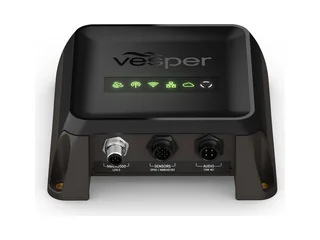
Garmin Cortex M1 (formerly Vesper) — premium all-in-one
Vesper Marine is now part of Garmin, and this hub is sold today as the Garmin Cortex M1 Hub (part 010-02815-20). It is the only unit in this category that legitimately replaces your VHF radio rather than supplementing it. Inside one black box you get a 5W Class B+ SOTDMA AIS transceiver, a 25W VHF radio with DSC, an integrated GPS, NMEA 2000 output, and Wi-Fi for the smartphone app. Cortex handsets connect to the hub over Wi-Fi, so you can mount the hub anywhere and put the handset at the helm — but note that the M1 Hub on its own ships without one; for VHF voice you add a Cortex H1/H1P handset, or buy the Cortex V1 bundle (hub plus H1 handset, $1,999.99 list at Garmin). The smartphone app is the standout — anchor watch, MOB alarm, AIS target tracking, and DSC distress calling, all from your phone or tablet. It is genuinely expensive, but for a cruising boat being equipped from scratch, the bill of materials it consolidates is real: VHF + handset + AIS transceiver + standalone GPS + anchor alarm app + chart-overlay box, all in one unit.
Strengths
- 5W Class B+ SOTDMA — top tier of recreational AIS
- Replaces VHF, DSC, and AIS box with a single integrated system
- Wireless remote handsets — mount the hub belowdecks
- NMEA 2000 native plus simultaneous Wi-Fi output
- Anchor watch and MOB alarm via the Cortex Onboard app
- Software updates have steadily added features since launch
Trade-offs
- $1,449.99 list for the hub alone ($1,999.99 with a handset) — by far the most expensive option here
- Overkill if you already have a VHF you're happy with
- Wireless handset adds RF complexity to an installation
- Tied to the Garmin Cortex ecosystem for future updates
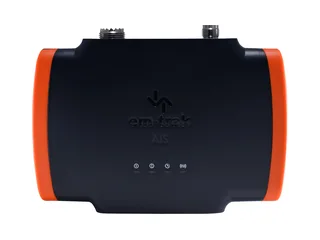
Em-Trak B952 — best-value transceiver
The B952 is the unit we'd recommend to any cruiser who already has a chartplotter they like and just wants the safety upgrade of a 5W transceiver at a sane price. It's a no-display blackbox — you read AIS targets on whatever plotter you already own — and that single design decision is what keeps the price at half of what the all-in-ones charge. The internal GPS antenna means you don't have to buy or run a separate puck (Em-Trak's older units required an external GPS, which doubled the install complexity). NMEA 2000 connects directly to your existing backbone; USB lets you set up the unit by laptop or wire it to a Raspberry Pi. IPX7 is genuine water immersion protection, which matters in a lazarette install.
Strengths
- Class B+ SOTDMA at roughly half the price of premium options
- Internal GPS antenna — no second cable run
- NMEA 2000 + USB outputs — works with any plotter or Pi
- IPX7 water immersion rating — survives a wet locker
- Em-Trak's commercial-AIS heritage means proven RF design
Trade-offs
- No display — you need a chartplotter or app to see anything
- No Wi-Fi — add an N2K-to-Wi-Fi gateway if you want phone access
- No app of its own — config is via USB and a desktop utility
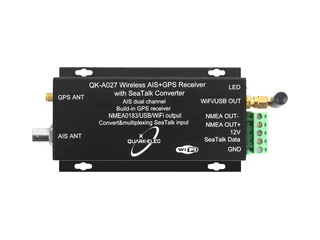
Quark-elec QK-A027 — Wi-Fi receiver only
The QK-A027 is the receiver we'd point at almost any sailor who isn't sure they need to transmit. Under $200, dual-channel receiver (catches both AIS frequencies simultaneously instead of alternating), broadcasts NMEA 0183 over Wi-Fi to your phone or tablet, and also outputs over USB (to a laptop or Pi for OpenCPN) and a wired NMEA 0183 port. It also has a built-in GPS receiver (add a GPS antenna) and a SeaTalk1-to-NMEA converter. There's no MMSI registration to do, no install paperwork, and barely any power-budget concern — Quark-elec rates it under 120 mA at 12V, fed through its SeaTalk terminals. Make sure you're buying the plain A027, not the A027+: the plus model is Quark-elec's pricier sibling that adds NMEA 2000 and Ethernet outputs. The catch is the honest one: you see other vessels, they don't see you. For a cruiser in shipping lanes, that's a meaningful safety gap. For a Sunday daysailor on a lake, it's a non-issue.
Strengths
- Under $200 — entry-level pricing for actual marine-grade hardware
- No MMSI registration required
- Wi-Fi output works with OpenCPN, Aqua Map, Navionics, iSailor
- Dual-channel receiver — catches both AIS frequencies at once
- Tiny power draw — under 120 mA at 12V
Trade-offs
- You are invisible to other AIS users — a real safety con in commercial water
- Powered through the SeaTalk terminals — wire it to 12V carefully (a wiring mistake can damage it or other SeaTalk gear)
- No NMEA 2000 on this model (that's the A027+) — you're using Wi-Fi, USB or NMEA 0183, not a backbone connection
- Plastic enclosure — not as marine-hardened as Em-Trak or the Garmin Cortex
Two more we considered
The Digital Yacht AIT2000 (check price) is a long-time favorite in the cruising community — Class B+ output, NMEA 2000, USB, and a separate iAIS Wi-Fi gateway sold as an accessory. We don't recommend it as a top pick only because the Em-Trak B952 ships with the internal GPS the AIT2000 doesn't, at a similar price. If you already own a Digital Yacht ecosystem of products, it's still a perfectly good buy.
The Garmin AIS 800 (check price) is the right answer if you have a Garmin chartplotter and want guaranteed plug-and-play integration with the Garmin ecosystem. It's Class B (the older CSTDMA standard, 2W) rather than B+, which is the reason we didn't list it as a top pick — but for a Garmin-loyal owner who values seamless integration over raw output power, it remains a clean choice.
Antennas and the VHF splitter question
Your AIS unit is a radio. Radios need antennas. This sounds obvious, but the antenna decision is where most installations go sideways — partly because the marketing of antennas is genuinely confusing, and partly because the choice involves a real trade-off that no vendor wants to flag clearly.
You have three options.
Option 1: A dedicated AIS antenna
The cleanest install. A dedicated AIS antenna — like the Shakespeare 5215-AIS (check price) — is tuned specifically for the 161.975 / 162.025 MHz AIS channels. Because it doesn't have to compromise for the broader VHF marine band, it pulls in weak distant targets that a general-purpose VHF antenna would lose in the noise floor. You also keep your existing VHF radio antenna entirely independent, which means a failure on one system doesn't take down the other.
The cost is mast space and another cable run. On a sailboat, finding room on the masthead for a second antenna usually means moving the wind instrument or accepting a deck-mount on the radar arch. On a powerboat with a hardtop, it's usually easy.
Recommend this if: you have the mast or hardtop space for it.
Option 2: An active VHF/AIS splitter
An active splitter lets a single VHF antenna serve both your VHF radio and your AIS unit without signal loss. Inside the splitter is an amplifier and a switch that gives the VHF radio priority when it's transmitting (so your radio doesn't blast through the AIS receiver) and shares the antenna for receive duty between both devices.
The Shakespeare AIS-VHF splitter (check price) and the Digital Yacht SPL2000 (check price) are the two most common active splitters. Both are around $200–$300. Both work well. Both add another component to your RF chain that can fail, which on a long passage matters.
Recommend this if: you can't add a second antenna and you want both AIS and VHF on one mast.
Option 3: A passive splitter
Don't. Passive splitters cut signal strength to both the VHF radio and the AIS receiver by roughly 3dB each — equivalent to halving your transmit power and halving your receive sensitivity. In an emergency where you need to be heard or you need to see a target you wouldn't otherwise spot, those 3dBs are exactly the dBs you can't afford to lose.
AIS on Starlink-only boats
An increasing number of cruisers — particularly on minimalist power cats and Starlink-equipped trawlers — ask whether they need an AIS unit at all if they have Starlink and a smartphone. The argument goes: there are free apps like MarineTraffic (vendor link) that show me commercial AIS targets in real time, so why install a VHF-band radio at all?
The answer matters. Internet AIS apps aggregate data from shore-based receivers that listen to the VHF AIS band and upload positions to a centralized cloud service. They show you commercial ships beautifully — most commercial vessels are within range of at least one shore receiver in most of the world's developed cruising grounds. What they do not show you is the recreational sailboat anchored next to you, the trawler entering the bay, or the small fishing boat crossing your bow. Those vessels are transmitting at 2W or 5W — they reach you, they reach other boats, but they almost never reach a shore receiver far enough away to upload to the cloud.
And critically: your phone position is not broadcast back over AIS. MarineTraffic shows you commercial ships, but other AIS-equipped vessels in your area cannot see you. You are still invisible to the freighter coming up the channel.
The practical recommendation: even if you have Starlink and use MarineTraffic for situational awareness of distant commercial traffic, install a Class B+ transceiver for VHF-band reception of nearby vessels and for your own broadcast to other boats. Internet AIS supplements; it does not replace. For more on how Starlink and traditional comms layer together, our marine internet stack guide covers the full picture.
Install gotchas and MMSI registration
GPS antenna placement
Every transmitting AIS unit needs a GPS feed — your broadcast includes your exact position, so the GPS antenna has to have clean sky view. Units with internal GPS antennas (like the Em-Trak B952) need to be mounted somewhere with no metal directly above them — under a fiberglass deck is fine, under a steel hardtop is not. Units with external GPS antennas (an extra puck on a small mast or rail) give you flexibility on where the AIS box itself lives, at the cost of one more cable run. Decide which constraint matters more before you buy: cable runs or mounting location.
MMSI registration
You cannot legally transmit on AIS without a registered MMSI number tied to your specific vessel. In the United States, an MMSI for recreational use is free and is issued by BoatUS or Sea Tow in about ten minutes online — you fill out a form with your vessel name, registration number, and a couple of safety contacts, and you get a 9-digit MMSI that you program into the AIS unit before its first transmission. In Canada, MMSIs come from Industry Canada (also free). In the UK and most of Europe, MMSIs are issued by the national radio regulator and may require a ship radio license — slightly more paperwork.
One non-obvious point: your VHF radio MMSI and your AIS MMSI should be the same number if both are on the same vessel. DSC calls and AIS broadcasts both reference the MMSI, and having one number per boat keeps your identity consistent across both systems. If you already have an MMSI programmed into your VHF, use that one.
Power draw and fusing
A Class B+ transceiver pulls roughly 2–3 amps briefly when it transmits and otherwise sits at 200–400 mA on receive. The current spike at transmit is short — typically under a second — but the wire and fuse have to handle it cleanly. Use 14 AWG or heavier wire on the 12V feed, and fuse the circuit at 5A. Avoid running the AIS off the same fused circuit as your VHF radio if you can help it — that way an over-current event on one doesn't take both out at the same time. For broader thinking on always-on monitoring and power budgeting at the dock or at anchor, our cellular boat monitoring guide walks through 24/7 power-budget math.
VSWR check after install
Once the unit is wired up and the antenna is connected, check the VSWR (Voltage Standing Wave Ratio) on the AIS channels before you put it on the air. A bad cable connection, a corroded coax fitting, or a poorly-tuned antenna will give you a high VSWR — which both reduces your effective transmit range and, over time, can damage the transmitter. Most transceivers report VSWR through their configuration utility (the Em-Trak utility shows it directly; the Cortex Onboard app surfaces it too). A reading under 2:1 is fine; over 3:1 is a problem you need to chase down before you trust the system. The most common cause: a coax connector that wasn't fully tightened or had moisture inside.
If you sell the boat, the MMSI goes with the boat — it's tied to the vessel, not the owner. Tell the new owner that they need to re-register the MMSI in their name. If you buy a used boat with an installed transceiver, get the MMSI re-issued before you transmit on it. An MMSI registered to the wrong person is technically a violation, and more practically it means a distress call routes to the wrong contact info.
Who should buy what
Frequently asked questions
Do I need an AIS receiver or a transceiver?
A receiver lets you see other AIS-equipped vessels on your chartplotter but does not broadcast your own position — you remain invisible to other AIS users. A transceiver both receives and broadcasts, so other vessels see you on their plotters. If you cross shipping channels or share anchorages with commercial traffic, you want a transceiver. For protected inland water with no commercial vessels, a receiver under $200 is an honest answer.
What is the difference between Class B and Class B+ (SOTDMA) AIS?
Class B CSTDMA is the original recreational AIS standard — 2W output, lower transmit priority, position broadcasts every 30 seconds when moving. Class B SOTDMA (Class B+) is the newer standard — 5W output (more than double the range), guaranteed time-slot access on the same channel as Class A vessels, and faster position updates every 5–15 seconds when underway. A 2W signal reaches roughly half the distance of a 5W signal, which in fog or busy traffic is the difference between being visible at 8 miles versus 4 miles.
Do I need an MMSI number to use AIS?
You only need an MMSI if your AIS unit transmits. Receive-only units do not require an MMSI. To transmit, you must have a Maritime Mobile Service Identity number registered to your specific vessel. In the United States, MMSI registration for recreational use is free through BoatUS or Sea Tow and takes about ten minutes online. In Canada, MMSIs come from Industry Canada (also free). In the UK and most of Europe, MMSIs are issued by the national radio regulator and may require a ship radio license.
Can the MarineTraffic app replace an onboard AIS unit?
No. MarineTraffic and similar apps aggregate data from shore-based AIS receivers, which means they show you commercial ships in cloud-monitored waters but they do not show you the recreational sailboat anchored next to you, the trawler entering the bay, or small fishing boats crossing your bow. Critically, your phone position is not broadcast back over AIS — other AIS-equipped vessels still cannot see you. Internet AIS apps supplement an onboard transceiver; they do not replace one.
Can I share my VHF antenna between my radio and my AIS unit?
Yes, with an active VHF/AIS splitter. An active splitter contains an amplifier and a priority switch that gives the VHF radio priority during transmit and shares the antenna for receive duty between the radio and the AIS unit. Never use a passive splitter — it cuts signal strength to both devices by roughly 3dB, halving transmit power and receive sensitivity. The cleanest install is a dedicated AIS antenna on its own cable run when mast or hardtop space allows.
What happens to the MMSI if I sell or buy a used boat with AIS installed?
The MMSI is tied to the vessel, not the owner — when you sell the boat, the MMSI goes with it. The new owner must re-register the MMSI in their name before they transmit. If you buy a used boat with an installed transceiver, get the MMSI re-issued before you transmit. An MMSI registered to the wrong person is technically a violation and, more practically, means a distress call routes to the wrong contact info.
The short version, by profile
Coastal cruiser sharing an anchorage with shipping traffic: Garmin Cortex M1 if budget allows the integrated VHF (you're consolidating four boxes into one); Em-Trak B952 if you keep the VHF you have. Either way, you want 5W Class B+ output and SOTDMA time-slot priority. This is the boat where AIS matters most, and it's where the upgrade from receive-only to transmit pays off in safety terms.
Liveaboard sailor on a budget: Em-Trak B952 transceiver paired with a Shakespeare 5215-AIS dedicated antenna. Best value in the category — 5W output, NMEA 2000 to whatever plotter you already own, and a separate antenna so a VHF failure doesn't take out your AIS at the same time. Total install around $750–$850 plus an hour or two of wiring.
Daysailor or river cruiser who just wants to see commercial traffic: Quark-elec QK-A027 receiver. Honest pick — if you sail in protected water with no shipping lanes, you do not need to transmit. Under $200, runs off USB, broadcasts AIS data over Wi-Fi to whatever phone or tablet you already use for navigation. The right tool for the actual job you're doing.
The general rule: if your worst-case encounter involves a vessel longer than 100 feet, buy a Class B+ transceiver. If it doesn't, a receiver is enough — and the money is better spent on a better anchor, better ground tackle, or a second battery.