Failover, load balancing and bonding are three different things
A multi-WAN router has more than one way out to the internet. On a boat that usually means Starlink on an Ethernet cable plus a cellular modem, and sometimes marina Wi-Fi as a third. Every router in this guide can switch between them automatically. What it does at the moment of switching is where they differ, and where the marketing gets slippery.
1. Health-check failover: free, but every session resets
The router pings a couple of addresses (Cloudflare's 1.1.1.1 and Google's 8.8.8.8 are the usual choices) every few seconds through each connection. When Starlink stops answering, it marks that link down and sends new traffic out of the cellular modem instead. Then it switches back when Starlink recovers.
This is built into every router here at no extra cost. GL.iNet calls it Multi-WAN, Teltonika calls it Failover, and Peplink sets it up with WAN priorities. The catch is that your devices' open connections were tied to the Starlink address. When the router switches, a video call freezes and reconnects, a large download may restart, and a VPN has to re-establish. Detecting the failure and switching takes from a few seconds to about a minute, depending on how the health check is tuned.
2. Load balancing: more total capacity, not a faster download
Load balancing spreads separate connections across both links: one device's streaming goes out over Starlink, another's software update over cellular. It raises the total the boat can use at once. It doesn't make a single download faster. The OpenWrt documentation for mwan3, the multi-WAN software GL.iNet builds on, says so plainly: it isn't channel bonding and won't speed up one download from one computer. On a boat with a metered cellular SIM, load balancing is usually the wrong choice anyway, because it spends cellular data you'd rather keep for emergencies.
3. Bonding and session-proof failover: Peplink's SpeedFusion
Peplink's SpeedFusion works differently. The router builds an encrypted tunnel over every link to a server on the internet, and your traffic leaves through that server. Because the outside world only ever sees the server's address, the router can move your traffic from Starlink to cellular mid-call without the far end noticing. Peplink offers three modes:
- Hot Failover keeps the tunnel up on all links but sends traffic down one at a time, switching instantly when one fails.
- WAN Smoothing sends duplicate copies of your traffic down both links, so a lost packet on one arrives on the other. It's the best option for calls, and it uses twice the data.
- Bandwidth Bonding combines the links into one faster tunnel.
Two things the spec sheets put in small print matter a lot on a boat:
- You need the server at the other end. That's SpeedFusion Connect, Peplink's cloud service, or a FusionHub you run yourself, or a second Peplink router at home. Without one, a Peplink does plain failover like everything else.
- The cloud service has a data allowance. PrimeCare includes 500 GB a year of SpeedFusion Connect on the B One 5G and 1 TB on the BR1 Pro 5G. Past that, the tunnel slows to 10 Mbps until you buy more. Peplink lists top-ups from $20 for 500 GB (180 days) and $40 for 1 TB (a year). A liveaboard streaming over Starlink can go through 500 GB in a few months, so the practical setup is to send only calls and work traffic through the tunnel and let streaming go direct.
The one-box test: Starlink on Ethernet, plus its own modem
The simplest boat install is one router that takes Starlink on an Ethernet cable and has its own cellular modem inside. That's one box to power, one Wi-Fi network and one place to configure failover. Four routers here pass that test: the GL.iNet Spitz AX, the Peplink B One 5G, the Pepwave MAX BR1 Pro 5G and the Teltonika RUTM50.
The others have Ethernet WANs but no modem. The GL.iNet Flint 2 and Flint 3, the plain Peplink B One and the MikroTik hAP ax3 all need a second internet source, such as a phone tethered by USB, a cellular hotspot on another Ethernet port, or marina Wi-Fi used as a WAN. That's fine if you already own the hotspot. It's one more box, one more power supply and one more thing to fail.
Two physical details are easy to miss. First, the Spitz AX has only one LAN port, so if you're also wiring in an NMEA 2000 gateway, a camera or an onboard computer, add a small 12 V Ethernet switch. Second, check the power input. A router with a wide DC range (10–30 V on the Peplinks, 9–50 V on the Teltonika) can run straight from a fused 12 V circuit. A router that wants exactly 12 V, like the Flint 2, is safer behind a regulated converter, which our guide to powering a boat computer covers.
Starlink as a WAN: bypass mode, ports and addresses
To put Starlink behind your own router, you turn off Starlink's router functions with bypass mode. Starlink's support page says it disables the Starlink router's Wi-Fi completely. You switch it on in the Starlink app under Settings, and the app can't switch it back off: that takes a factory reset. Peplink's Starlink configuration guide calls bypass mode mandatory for SpeedFusion, because leaving Starlink's router in place creates a double NAT that stops the tunnel forming. GL.iNet's Starlink FAQ asks for it too.
How you get an Ethernet cable out of Starlink depends on the hardware:
- Starlink Mini. The router is built into the dish. Put it in bypass mode in the app, remove the Starlink Plug from the Mini's RJ45 port, and plug in the Mini Starlink Cable or your own Ethernet cable. Starlink's spec sheet warns that the Mini is no longer rated IP67 with a standard RJ45 cable, so seal or shelter that connection on deck. The Mini accepts 12–48 V and averages 25–40 W, which our solar guide budgets for.
- Standard kit with the Gen 3 router. The router has two Ethernet LAN ports under a rubber cover. Enable bypass mode, then plug your router into one of them.
- Older Gen 2 router. It has no Ethernet port. You need an Ethernet adapter. Starlink sells its own in the Starlink Shop, and Best Buy has listed it for about $17. Third-party versions for the Gen 2 router are also sold on Amazon.
Two addressing details affect how you set things up. On Roam plans Starlink uses carrier-grade NAT: your router gets an address in the 100.64.0.0/10 range, and Starlink's support page says this "blocks all inbound ports". You can't port-forward to the boat, so remote access has to go out from the boat, which is what Tailscale does. A dynamic public IPv4 address is an option only on Priority and maritime plans. Starlink always provides a public IPv6 /56 prefix. Starlink also says mobile users get a new IP address when the dish moves between ground stations, with a brief outage while that happens. That's one more reason a boat on the move benefits from a second link.
Starlink drops out on boats more often than at home. Masts, rigging, a bimini or another boat's mast can block the view, sharp turns can interrupt it, and Starlink reconfigures its network every 15 seconds, which causes short latency spikes. Most interruptions last under a second. Some last many seconds, and those are what failover is for. One side effect of bypass mode: some routers lose sight of the dish's status page at 192.168.100.1 when the Starlink WAN fails its health check. Peplink owners fix this with an outbound rule that always sends traffic for 192.168.100.1 out of the Starlink port, and other routers can use a static route.
The routers, in detail
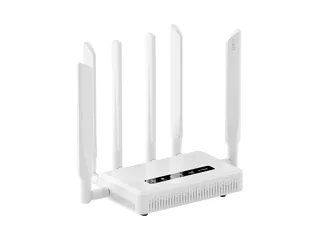
GL.iNet Spitz AX (GL-X3000) — the one-box answer for most boats
The Spitz AX is the router we already recommend in our cellular router guide, and it's also the simplest way to put Starlink and cellular in one box. Plug Starlink into its 2.5G WAN port, put a SIM in the 5G modem, and set the two as a failover pair under Network, then Multi-WAN. GL.iNet's user guide lists Ethernet, cellular, Wi-Fi repeater and USB tethering as multi-WAN sources, with failover or load balancing. GL.iNet's Starlink FAQ covers the Starlink side: put the Starlink router in bypass mode and connect it to the GL.iNet WAN port. It doesn't mention the separate Ethernet adapter that older Starlink routers need, which we cover above. The modem covers the main US 5G bands, including T-Mobile's n41 and n71 and the C-band n77. GL.iNet quotes under 14 W, and owners report about 5 W idle and 10 W at peak. It has six SMA antenna ports for external marine antennas. GL.iNet's store lists it at $379.99, and it has dropped to about $323 in sales. The trade-offs: failover is the session-resetting kind, there's one LAN port, and the GL.iNet admin pages sit on top of OpenWrt, which is capable but less polished than Peplink's InControl.
Strengths
- Starlink WAN plus 5G failover in one box, documented by the maker
- No subscription for any feature
- Dual SIM and six external antenna ports
- About $320 less than the cheapest Peplink with a modem
Trade-offs
- Failover resets open sessions; no bonding
- Only one LAN port
- Consumer plastic case, not rated for heat like the BR1
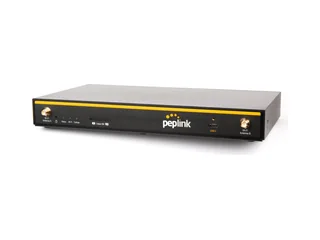
Peplink B One 5G — SpeedFusion at the lowest Peplink price
Peplink launched the B One series in 2024 as the replacement for the Balance 20X, which is no longer stocked by US dealers. The B One 5G has two Gigabit Ethernet WANs, a 5G modem with two SIM slots and eSIM, four LAN ports and Wi-Fi 6. Its spec sheet rates SpeedFusion at 400 Mbps unencrypted and 200 Mbps with AES encryption, comfortably above what Starlink and cellular deliver on a boat. It's the cheapest way to get session-proof Hot Failover and WAN Smoothing: PrimeCare B is included for the first year, with 500 GB a year of SpeedFusion Connect, then renews at $99 a year (5Gstore's price). If PrimeCare lapses, Peplink says routing and plain failover keep working; SpeedFusion and InControl stop. Peplink's firmware also pairs with a Starlink dish, so InControl shows the dish's throughput, latency and obstruction, and newer releases can ignore brief obstruction outages rather than failing over for every one. The catches are physical. It's an indoor plastic box rated only to 45 °C (113 °F), it takes power through a 4-pin Molex plug rather than screw terminals, and there's no ignition sensing or GPS. Mount it below decks, out of the sun. 5Gstore and Waveform list it at $699. If you'll supply cellular yourself, the modem-free B One is $359, with the same two WANs and $49-a-year PrimeCare A.
Strengths
- Hot Failover and Smoothing keep calls up through a Starlink dropout
- Two Ethernet WANs plus 5G: Starlink, marina Wi-Fi bridge and cellular
- Wide 10–30 V DC input
- Plain failover still works with no PrimeCare
Trade-offs
- Indoor plastic case rated to 45 °C
- Molex power plug, no ignition sense
- 500 GB/yr SpeedFusion allowance runs out fast if you tunnel everything
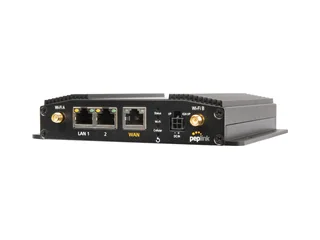
Pepwave MAX BR1 Pro 5G — the rugged choice for boats that live aboard
The BR1 Pro 5G has the same SpeedFusion features as the B One 5G in a box built for vehicles and boats: a metal case rated from −40 to 65 °C, ignition sensing so it can power down with the engine, built-in GPS, and PoE input on the current 5GK version (Qualcomm X65 modem). It has one 2.5G Ethernet WAN, which Starlink plugs into, two LAN ports and Wi-Fi 6. Its PrimeCare tier includes 1 TB a year of SpeedFusion Connect, twice the B One 5G's allowance, which matters if you're on Starlink most of the time. 5Gstore lists it at $999 with the first year of PrimeCare, and PrimeCare C renews at $149 a year. It's also one of the routers that fits Peplink's Antenna MAX S enclosure, which mounts the router and a Starlink Mini together at the antenna. Compared with the B One 5G, you pay $300 more for the rugged case, GPS and bigger allowance, and you give up the second Ethernet WAN and two LAN ports.
Strengths
- Metal case rated to 65 °C, ignition sensing, GPS
- 1 TB a year of SpeedFusion Connect with PrimeCare
- PoE input and the Antenna MAX S option
Trade-offs
- One Ethernet WAN and two LAN ports
- $149 a year to keep SpeedFusion after year one
- An older X62 version is still sold: check the SKU
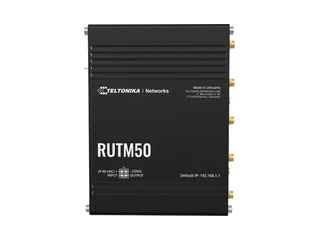
Teltonika RUTM50 — wide-voltage and frugal, for DIY installers
Teltonika makes industrial routers for vehicles and machinery, and the RUTM50 is its current 5G model for North America: FCC certified, and certified on AT&T and T-Mobile. It has the widest power input here, 9 to 50 V DC, and the lowest draw: Teltonika measures about 3 W idle and 9 W at most on 12 V, roughly half of the others. RutOS, its firmware, has a Failover page that tracks each WAN by ping every few seconds and switches by priority, so Starlink on the Ethernet WAN with the 5G modem behind it is a standard setup. It doesn't bond or keep sessions alive, and its Wi-Fi is the older Wi-Fi 5, so many boats will add a separate access point. 5Gstore lists it at $598. Avoid the similar-sounding RUTX50: Teltonika has put it on end-of-life notice and it was never sold in a US version.
Strengths
- 9–50 V input: wires straight into 12 or 24 V
- Lowest power draw of the five
- No subscription; detailed failover controls
Trade-offs
- Wi-Fi 5 only
- No session-proof failover or bonding
- RutOS is built for installers, not first-timers
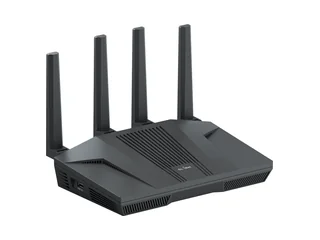
GL.iNet Flint 2 and Flint 3 — when you already own a hotspot
If you already have a cellular hotspot or a spare phone, a modem-free router does the failover for much less. The Flint 2 (GL-MT6000) is the router in our VPN guide: Starlink goes into its 2.5G WAN, and recent GL.iNet firmware lets you turn one LAN port into a second WAN for a hotspot. It can also fail over to a phone on USB tethering or to marina Wi-Fi in repeater mode, all from the same Multi-WAN page as the Spitz AX. GL.iNet's US store lists it at $169.99. Its successor, the Flint 3 (GL-BE9300), adds Wi-Fi 7 and five 2.5G ports, one of them switchable to WAN, for about $190–230 depending on the retailer. Both run from a 12 V, 4 A barrel adapter with no published wide-voltage range, so feed them from a regulated 12 V converter rather than the raw battery.
Strengths
- Cheapest way to automatic failover if you own a hotspot
- Same GL.iNet Multi-WAN and Tailscale support as the Spitz AX
- Plenty of LAN ports
Trade-offs
- Needs a second box for cellular
- 12 V only: use a regulated supply
- Session-resetting failover
MikroTik hAP ax3 — the $139 DIY route
For people who like configuring networks, MikroTik's hAP ax3 runs RouterOS and does failover with route distances and gateway checks, the method MikroTik documents in its WAN-backup guide. Starlink goes on an Ethernet port, and the backup can be a USB LTE modem, which RouterOS v7 drives, or a hotspot on another port. It takes 12–28 V DC and costs about $139. There's no setup wizard for any of this, so it's command line or MikroTik's WinBox tool. If you'd rather not learn RouterOS, buy a GL.iNet. MikroTik's Chateau 5G ax has a modem built in, but it lacks FCC certification and the main US 5G bands, so it isn't one for US boats.
Strengths
- Very capable routing for the money
- 12–28 V DC input
Trade-offs
- Hard to set up; no failover wizard
- No built-in modem
Setting up failover: the settings that matter
The menus differ, but the job is the same on every router. These are the settings to get right, in order:
- Make Starlink the primary WAN and cellular the backup. On GL.iNet, choose Failover (not Load Balance) on the Multi-WAN page and drag Starlink to the top. On Teltonika, it's Network, then Failover, with Starlink given the lower metric. On Peplink, put Starlink at priority 1 and cellular at priority 2. Keep cellular out of any load-balancing group if the SIM has a data cap.
- Tune the health check. Each WAN pings test addresses, typically 1.1.1.1 and 8.8.8.8, and is marked down after several misses in a row. OpenWrt's own mwan3 defaults (a test every 10 seconds, down after five failures) take nearly a minute to switch. GL.iNet hides this behind its Sensitivity setting, Teltonika defaults to a 3-second interval, and Peplink lets you set the interval, timeout and retries. Peplink's Starlink guide suggests a ping every 10 seconds with five retries. Shorter is faster but flaps on Starlink's brief dropouts.
- Give each WAN its own DNS. If the router only uses DNS servers handed out by Starlink, a Starlink outage can stop all name lookups even after failover, so the boat looks offline on a working cellular link. Set public DNS servers (Cloudflare or Google) on the router itself.
- Cap the cellular data. Set a monthly allowance on the cellular WAN so a software update that kicks off during a Starlink outage doesn't burn the SIM. Peplink calls it Bandwidth Allowance, and GL.iNet and Teltonika have data-limit settings on the modem.
- On a Peplink, choose what goes through SpeedFusion. Send video calls and work VPNs through the SpeedFusion Connect tunnel with Hot Failover or Smoothing, and let streaming and updates go out directly. That keeps you inside the yearly data allowance.
- Run Tailscale on the router. Tailscale reconnects by itself after a WAN switch: it starts on a relay and finds a direct path again within a few seconds. Plain WireGuard copes with one end changing address but not both, so Tailscale is the easier choice for a boat. Our VPN guide covers the install on GL.iNet and Peplink.
Then test it. Unplug Starlink's Ethernet cable while a video call is running, and time how long the call takes to recover. Plug it back in and check that traffic returns to Starlink. Do it at the dock, not on your first offshore passage.
The cellular backup plan
A failover SIM sits idle most of the month, so a capped data plan is usually enough. These were the US carriers' published data-only plans on 26 October 2026:
| Carrier | Plan | Data | Price | Notes |
|---|---|---|---|---|
| T-Mobile | 25GB Data Plan 2.0 | 25 GB, then 600 kbps | $25/mo | AutoPay price, plus taxes |
| T-Mobile | 100GB Data Plan 2.0 | 100 GB, then 600 kbps | $50/mo | AutoPay price, plus taxes |
| Verizon | Plus / Pro | 50 GB / 100 GB | $40 / $60 | With a Verizon phone line; Pro is $90 on its own |
| AT&T | DataConnect | 50 GB / 100 GB | $55 / $90 | AutoPay and paperless; $10 per extra 5 GB |
None of the three carriers' plan pages lists routers as eligible devices. They name hotspots, tablets and USB modems. The Teltonika RUTM50 is AT&T and T-Mobile certified, and the Spitz AX is T-Mobile and AT&T IoT certified, but certification doesn't guarantee a plan allows router use. Check with the carrier before you buy. Our cellular router guide covers carrier choice and antennas in more detail.
If you're working through the Peplink SpeedFusion allowance, budget for that too. Peplink lists SpeedFusion Connect top-ups from $20 for 500 GB.
Frequently asked questions
What is a multi-WAN router?
A router with more than one internet connection, such as Starlink on Ethernet plus a cellular modem. It watches each connection and moves traffic to a working one when another fails. Most can also spread traffic across connections. Only some, like Peplink's SpeedFusion routers, can bond them or keep open sessions alive during a switch.
Does failover keep my video call connected when Starlink drops?
Not with ordinary failover. Open connections are tied to Starlink's address, so when the router switches to cellular a call freezes and reconnects. Keeping it up needs Peplink's SpeedFusion Hot Failover or WAN Smoothing, which route your traffic through a cloud server, so the far end never sees the address change.
Can I bond Starlink and cellular into one faster connection?
Only with a bonding service. Peplink's SpeedFusion does it through its SpeedFusion Connect cloud or a FusionHub you host. GL.iNet, Teltonika and MikroTik routers load-balance separate connections across both links, which raises the boat's total capacity but doesn't speed up a single download.
Do I need a Peplink subscription for failover?
No. Peplink says routing and the web interface keep working without PrimeCare, and plain WAN-priority failover is part of that. PrimeCare, included for the first year, is needed for SpeedFusion Hot Failover, Smoothing and Bonding, and for the InControl cloud dashboard. It renews at $49 to $149 a year depending on the model.
Do I need Starlink bypass mode?
For SpeedFusion, yes: Peplink says the double NAT you get without it stops the tunnel forming. For plain failover it's recommended rather than essential, and both Peplink and GL.iNet tell you to use it. Bypass mode turns off Starlink's router so yours gets the connection directly. You enable it in the Starlink app, and turning it off again needs a factory reset.
How fast does failover switch from Starlink to cellular?
It depends on the health-check settings, from a few seconds to about a minute. OpenWrt's default mwan3 settings take close to a minute, while a 3-second check on a Teltonika is much quicker. Faster settings react to Starlink's brief obstruction dropouts too, so the router can flap between links. We haven't timed these routers ourselves.
The short version, by boat
Most boats with Starlink: GL.iNet Spitz AX, about $380. Starlink into the WAN, a SIM in the modem, failover on, no subscription.
You work from the boat and can't drop calls: Peplink B One 5G, $699, with SpeedFusion Smoothing for calls only. Mount it somewhere cool.
Liveaboard, hot engine room or harsh install: Pepwave MAX BR1 Pro 5G, $999, with a 1 TB yearly SpeedFusion allowance.
24 V boat or lowest power draw: Teltonika RUTM50, $598. Already own a hotspot: GL.iNet Flint 2, $169.99.