Pi or mini PC: how to choose
Both do the same job on a boat: run a Signal K server, Home Assistant or OpenCPN around the clock, take in your NMEA 2000 data through a gateway, and serve it to your phone, tablet or a screen at the helm. The difference is what they cost you in power, setup effort and headroom.
Pick the Raspberry Pi 5 if the computer will mostly run headless (you reach it from a phone or laptop), power is tight because you live on battery or solar, or you want the best-documented path for Signal K, OpenPlotter and Home Assistant. It idles at a few watts and the whole stack is well trodden.
Pick a mini PC if you want a real desktop with a browser, charting software and several windows open at once, you want more storage and network ports, or you need Windows-only software. You pay for it in a higher idle draw and a fan.
A rough sense of the daily cost: a computer idling at 3.5 W uses about 84 Wh a day, around 7 Ah from a 12 V battery. One idling at 6 W uses about 144 Wh, around 12 Ah, before conversion losses. Neither is large on a boat with shore power or a decent battery bank, but on a small solar-only boat the difference adds up. Our solar guide has the same worked numbers for other onboard devices.
None of the computers here is marine-rated, waterproof or fanless. Treat them as indoor electronics: mount them in a dry, ventilated spot away from the bilge, spray and direct sun. We haven't bench-tested any of them.
The computers in detail
Specs below come from the makers' own pages, and we say where something is unconfirmed. Amazon links go to searches, since we haven't verified individual listings or sellers.
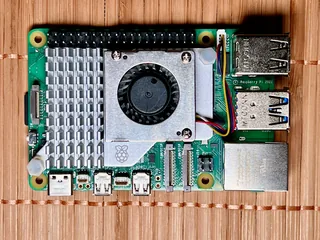
Raspberry Pi 5 — the low-power default
The Pi 5 is the board most boat setups are written around: OpenPlotter, Signal K and Home Assistant all have well-trodden Pi installs, and our Home Assistant and Signal K guides both start there. Raspberry Pi's product page asks for a 5 V/5 A USB-C power-delivery supply and recommends its 27 W unit, and says the board performs best with active cooling. NVMe storage works through the official M.2 HAT+, which matters on a boat (see below). Third-party tests put idle draw at roughly 3–4 W headless and 12–25 W under full load.
Strengths
- Lowest power draw here, which matters on battery and solar
- Best-documented platform for Signal K, OpenPlotter and Home Assistant
- NVMe boot through the M.2 HAT+ avoids SD-card corruption
- Cheap to replace, with a huge parts ecosystem
Trade-offs
- Needs a proper 5 V/5 A supply: a weak one caps USB power and can cause instability
- You assemble it: board, cooler, case, NVMe HAT and SSD
- A desktop works, but heavy desktop apps are slower than on an x86 mini PC
- Pricing and 8 GB availability vary, so check current listings
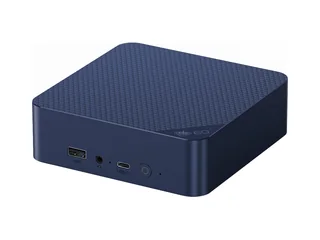
Beelink EQ14 — a real desktop with headroom
The EQ14 is the one to look at if you want an actual desktop on the boat: Beelink lists 16 GB of DDR4, two M.2 PCIe 3.0 slots, dual 2.5 GbE, a fan with heat-pipe cooling and a 3-year warranty. It ships with Windows 11 Home, and Beelink does not list Linux support, so check reviews for Ubuntu on this exact model before you commit. The page also lists a 12 V/4 A adapter output while describing a built-in power supply, so check which arrives in the box. On 12 October Beelink's own store showed it as a pre-order at $385. One third-party Proxmox test of an EQ14-class N150 box read about 6 W idle and 18–22 W loaded.
Strengths
- Much more headroom than a Pi for a full desktop, charting and Home Assistant together
- Two M.2 slots and dual 2.5 GbE for a bigger storage or networking build
- 3-year warranty from the maker
- 12 V-class adapter output simplifies a DC-DC supply
Trade-offs
- Roughly double the Pi's idle draw
- Fan-cooled, so keep it dry and ventilated: it is not marine-rated
- Ships with Windows; Linux is possible but not listed by the maker
- Maker page was inconsistent on TDP and power supply, and it was a pre-order on 12 October
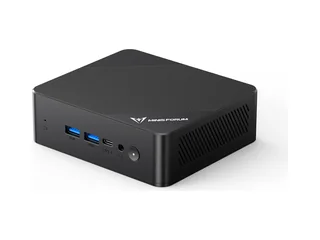
Minisforum UN100P — the budget N100
The UN100P is the cheapest way into an x86 boat computer here: an Intel N100 with 16 GB of RAM and a 256 GB or 512 GB SSD, listed at $191.90 and $207.90 on Minisforum's store. Both variants showed as unavailable there on 12 October, so you may need to find it elsewhere or step up to its N150 sibling, the UN150P. We could not confirm its power input range or cooling from the maker page, so read the spec sheet for the exact listing before you plan the wiring around it.
Strengths
- Lowest entry price of the x86 options
- N100-class power: plenty for Signal K, Home Assistant and OpenCPN
- Often has a free 2.5-inch drive bay (check the exact model)
Trade-offs
- Maker store showed it unavailable, so stock is the first thing to check
- Power input and cooling not confirmed on the maker page
- Not marine-rated; ships with Windows
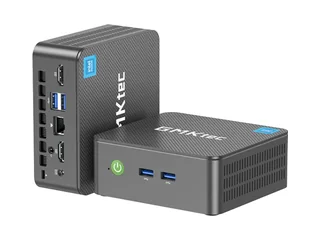
GMKtec NucBox G3 Plus — N150 with an NVMe slot
GMKtec's G3 Plus pairs an N150 with 16 GB of RAM and a 512 GB NVMe drive in the US variant, plus a second M.2 2242 slot, 2.5 GbE and four USB 3.2 ports. GMKtec lists a 12 V/3 A adapter and Windows 11 Pro. Its US store showed it sold out at $499.99 on 12 October, which is a high price for the class, so shop around and compare against the Beelink and Minisforum models. The maker's US page did not say whether it is fan-cooled.
Strengths
- NVMe system drive plus a second M.2 slot
- Four USB 3.2 ports suit a USB gateway, a touchscreen and a keyboard
- 12 V-class adapter
Trade-offs
- US store showed it sold out at a high price for the class
- Cooling not stated on the US page
- Short warranty on the US page compared with Beelink and Minisforum
- Not marine-rated; ships with Windows
Windows, Ubuntu and Linux on a mini PC
All three mini PCs here ship with Windows 11, and none of the maker pages we read lists Linux support. N100 and N150 machines generally run Ubuntu fine, but that is not a guarantee for your exact model, so look for owner reports of Ubuntu on the specific machine before you buy. If you only need to run Signal K, OpenCPN and Home Assistant, Linux is the cleaner choice. If you need Windows-only charting or radar software, keep Windows.
Powering it from a boat battery
This is the part most "mini PC for a boat" threads skip. A boat's 12 V system is not a steady 12 V. Victron's defaults for a 12 V lead-acid battery charge at 14.4 V absorption and 13.8 V float, its LiFePO4 manual recommends 14.2 V absorption, and one Victron community thread reports an outboard alternator reaching 14.8 V. A resting battery sits lower, around 12.6–12.8 V when full, and drops when loaded. In practice the bus runs from about 12 V up to about 14.8 V.
The mini PCs here list a 12 V adapter output, but we found no stated DC input range for the computers themselves on the pages we checked. Feeding them 14 V or more is outside anything the makers state, so you have three sensible options:
- An inverter and the supplied AC adapter. Simple and safe for the computer, but wasteful: the inverter idles and loses power all day.
- A regulated DC-DC converter that outputs a steady 12 V from a wide input range, rated well above the adapter's current (the EQ14's adapter is 12 V/4 A, so choose a converter with real headroom), fed through a fuse close to the battery.
- For a Pi 5, Raspberry Pi specifies a 5 V/5 A supply and recommends its 27 W unit. We found no established-brand 12 V converter that states 5 A over USB-C, so a UPS HAT that takes a boat feed directly (the Geekworm X1202 accepts 6–18 V) is the practical route. Our powering guide covers the details.
Size wire and fuse to the load and the run, keep the connection tidy and fused at the source, and if you're unsure ask a marine electrician. Our battery monitor guide and lithium house bank guide cover the battery side.
Regulated 12 V DC-DC converters and a marine fuse block are the two parts to shop for. Pick the converter's input range, output current and certifications from the listing, since quality varies widely.
Surviving power cuts and heat
Use NVMe, not an SD card, on a Pi. Raspberry Pi's own whitepaper, Making a more resilient file system, says power loss during a write can corrupt data and that flash wear is a separate failure mode. On a boat, where the battery switch gets turned off and shore power drops, that is not hypothetical. Boot the Pi 5 from an SSD through the M.2 HAT+ and the exposure falls sharply.
Shut down cleanly. A small UPS or shutdown board that signals a clean shutdown when power drops saves a running desktop from a hard cut. Pi-specific UPS HATs exist. For a mini PC we found no verified 12 V UPS from an established maker that signals shutdown, so shut it down from the operating system before you switch the battery off. See our powering guide. Note that Raspberry Pi's docs say a halted Pi 5 still draws about 1–1.4 W unless you set POWER_OFF_ON_HALT=1.
Keep it cool and dry. The Pi 5 does best with the active cooler, and the mini PCs are fan-cooled. Mount them where air can move and spray can't reach, and don't tuck a hot computer into a sealed locker.
Connecting it to the boat
The computer needs data to be useful, and on most boats that means NMEA 2000. A gateway reads the bus and hands the data to the computer, either over USB or over the network:
- USB gateway into Signal K. The Digital Yacht iKonvert shows up as a serial device that Signal K reads directly, and our NMEA 2000 gateway guide covers it as the pick for Signal K builds, along with the Actisense NGX-1.
- Wi-Fi or network gateway. A Yacht Devices YDWG-02 sends the data over your boat network, so the computer needs no USB cable to the bus and you can place it anywhere.
From there, install Signal K or OpenPlotter on the computer and point your apps at it. Our Signal K explainer walks through that, and the open-source chartplotter guide covers OpenCPN. A cheap ESP32 board with a CAN transceiver can also read NMEA 2000, but a proper gateway is safer for the rest of your electronics.
Shopping list
The parts that make a boat computer work, by route. All Amazon links below go to searches, so check the seller and exact model on the listing.
Raspberry Pi 5 8 GB · M.2 NVMe HAT · NVMe SSD · Official 27 W power supply · Active cooler · Case
Beelink EQ14 · Minisforum UN100P · GMKtec G3 Plus · More N100 mini PCs · 12 V-input models
Digital Yacht iKonvert (USB) · Yacht Devices YDWG-02 (Wi-Fi) · Actisense NGX-1
Frequently asked questions
Can I run Signal K and a Linux desktop on the same Raspberry Pi 5?
Yes. Signal K server runs on Raspberry Pi OS or Ubuntu, and you can use the same Pi as a desktop with a monitor, keyboard and mouse. A Pi 5 with 8 GB of RAM handles that, though a heavy desktop workload is slower than on an x86 mini PC, and a desktop draws more power than a headless Pi.
Raspberry Pi 5 or mini PC for a boat?
A Raspberry Pi 5 suits a low-power, mostly headless server for Signal K, OpenPlotter or Home Assistant. A mini PC suits a real desktop with more storage, ports and processing headroom, and Windows-only software, at the cost of a higher idle draw and a fan. Both need a clean 12 V supply and a way to shut down safely.
Can I power a mini PC straight from the boat's 12 V battery?
We would not. The mini PCs here list a 12 V adapter output, but we found no stated DC input range on the maker pages, and a boat's bus runs from roughly 12 V up to about 14.8 V while charging. Use a regulated DC-DC converter with a steady 12 V output and a fuse near the battery, or run the supplied AC adapter from an inverter.
Are these computers waterproof or marine-rated?
No. None of the computers here is waterproof or marine-rated, and the mini PCs are fan-cooled. Mount them in a dry, ventilated spot away from the bilge and spray. We haven't bench-tested them.
Should a Raspberry Pi on a boat use an SD card or an SSD?
An SSD. Raspberry Pi's own whitepaper says power loss during a write can corrupt data, and boat power gets cut often. The Pi 5 can boot from NVMe through the official M.2 HAT+. Pair it with a clean-shutdown board or UPS for extra protection.
How does the computer get my NMEA 2000 data?
Through a gateway. A USB gateway such as the Digital Yacht iKonvert plugs into the computer and Signal K reads it as a serial device, while a Wi-Fi gateway such as the Yacht Devices YDWG-02 sends the data over the boat network. See our NMEA 2000 gateway guide for how to choose.
The short version, by boat
Low power, mostly headless, Signal K or Home Assistant: Raspberry Pi 5 8 GB with an NVMe HAT and the official 27 W supply.
A real desktop on board: Beelink EQ14 (check stock, since the maker listed it as a pre-order), or another N100/N150 mini PC with 16 GB of RAM.
Cheapest x86 route: Minisforum UN100P, if you can find it in stock.
Either way: a regulated 12 V converter, a fuse near the battery, and a clean-shutdown plan.